19 Oct 2026
 Planet Grep
Mattias Geniar: Snapkin has an engineering blog now

Building Snapkin means running a lot of experiments. Which AI model reads a plate best, what a prompt change does to the accuracy, how long you wait for an answer, what each call costs, …
19 Oct 2026 3:16am GMT
Frederic Descamps: Vector Search in MySQL vs MariaDB: Look Beyond QPS
 A few days ago, I came across an interesting post by Hussain Patel on LinkedIn about HNSW index implementation differences in every vector databases. I was very surprised not to see MariaDB in the list. One day later, AskDBA (Alkin Tezuysal) published a benchmark article comparing vector search using MyVector on MySQL with the native […]
19 Oct 2026 3:16am GMT
Dries Buytaert: One description, inside and outside Drupal

My website has a custom photo album module that I've maintained for about twenty years. It helps me manage more than ten thousand photos. In my DrupalCon Rotterdam keynote, I talked about making that module work with AI assistants. You can watch that part of the keynote. I didn't have time on stage to go into the details, so I'm doing that in this post.
To let assistants find and edit my photos, I used the contributed Tool module, which provides Tool API, to expose my module's operations as tools. These include finding photos and updating a photo's caption or alt text.
Most of these tools are public methods on Drupal services I already had, like the one that searches my photos. A few PHP attributes are usually enough for Tool API to expose an existing method, so AI assistants can call it over MCP, the Model Context Protocol.
To describe a tool to other software, Tool API needs to know what data it accepts and returns: what each value is called, what type it is and what it means.
My album module doesn't store photos as Drupal entities (I know, I know), so Drupal has no field definitions for them. Instead, it keeps them in its own database table and loads each photo into an instance of Image, a plain PHP class. I added PHP attributes to the getters for the properties I wanted to expose, like this one for the alt text:
#[ToolProperty(description: 'Plain text describing the image for screen readers.', media_type: 'text/plain')]
public function getAlt(): string {
  ...
}
From attributes like this one, Tool API generates JSON Schema, a format for describing JSON data. MCP and OpenAPI, a standard for describing HTTP APIs, both use this format. So do Drupal's Single Directory Components, which use it to describe the data passed to reusable interface components.
In my album module, I use the same descriptions of my photo data to tell AI assistants what my tools return, generate TypeScript types for a React app that searches my photos, and define the inputs for my Drupal components.
The same tools also connect my site to various workflow systems. A workflow built with ECA, FlowDrop, Maestro, n8n or Activepieces can call the same photo-search tool an AI assistant calls, without requiring a separate integration with my album module.
A module maintainer exposes an operation once, and several kinds of software can use it.
Image.php Describes a photo once,in PHP attributes Tool API Generates JSON Schemafrom those attributes AI assistants Find, read and edit my photos over MCP Claude, or any other MCP client Front ends Search my photos with TypeScript types from OpenAPI React, Next.js, mobile apps Workflow systems Search my photos in workflows built without code ECA, FlowDrop, Maestro, Activepieces Drupal components Render my photos with props from a generated schema.json Single Directory Components, Drupal Canvas
This is why I said in my keynote that I believe the Tool module, built by Michael Lander and team, is one of the most important modules in Drupal right now. A module's capabilities can become available to assistants, front ends and workflows without its maintainer having to build for each one separately.
I think every Drupal module should work this way, which is why I featured it in my keynote and why I launched a broader effort around this called Rosetta.
The goal is for Drupal's own systems and software outside Drupal to work from shared descriptions of data and operations. Below, I'll walk through what I built and tested with my album module.
Drupal needs shared descriptions of data and operations
More of the work on a site happens outside Drupal every year: in AI assistants, in front ends built with JavaScript frameworks, and in orchestration platforms that connect Drupal to other systems. As I explained in AI and the great CMS unbundling, those systems still need the content management, governance and observability that Drupal already provides.
Drupal has entities, fields, permissions, revisions, workflows, content moderation and tens of thousands of contributed modules. But making a module's capabilities available to an assistant, a workflow or a front end still too often requires some integration work.
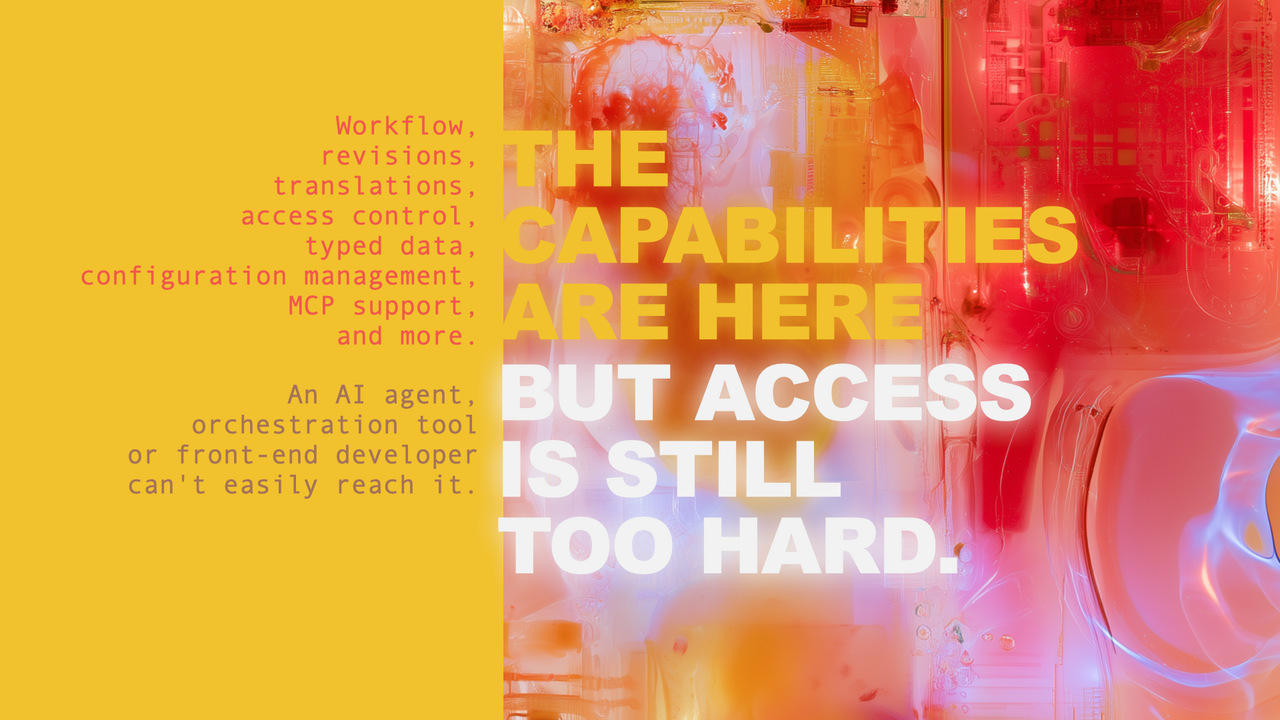 A slide from my DrupalCon Rotterdam 2026 keynote: Drupal has the capabilities, but making them available to other software is still too hard.
Installing a Drupal module should make its capabilities available to software already connected to a site: new tools for assistants, new operations for workflows, and new capabilities for front-end developers.
In my album module, I should only have to describe a photo once and implement photo search once, not write a separate integration for every assistant, front end or workflow system.
In Drupal, we already know why shared descriptions matter. When a site builder adds a field to a content type, Drupal stores a definition for it: its type, its label and whether it's required. Content editing forms, Views and JSON:API all reuse that definition.
CCK, Drupal's Content Construction Kit, let site builders define a field once, and Drupal used that definition for the edit form, the display and the database. Views let them list, filter and sort data from any module that described its data. Rosetta is about extending that kind of reuse to more of a module's data and operations.
Shared descriptions of data and operations could be Drupal's next CCK and Views moment.
User interfaces also keep changing: web pages, then native mobile apps, then headless front ends, then chat, and now AI assistants and agents. I don't know what comes after agents. But if modules describe their data and operations, new interfaces can build on the capabilities we already have. The next interface reads the description and gets to work. That won't make Drupal immune to change, but it makes us fast to adapt, and fast to adapt helps us win.
The question then becomes how to make that practical for thousands of module maintainers. Tool API gives us a starting point, alongside years of work on Typed Data, Single Directory Components, JSON:API, Drupal Canvas Code Components, Modeler API, and more. We need the people behind that work to help shape the approach, including whether Tool API, or parts of it, belongs in Drupal Core.
That's why I'm organizing the Rosetta Sprint: a few days for the people behind these projects to get together in person to compare the existing approaches, identify what is missing and agree on next steps with the relevant maintainers and Core committers.
Describe existing data and expose functions as tools
Tool API supports two ways to define a tool: (1) you can write a dedicated plugin class that Drupal discovers as a tool, or (2) add PHP attributes to an existing public method on a class registered as a Drupal service.
I started with a dedicated plugin class but ultimately switched to PHP attributes. Attribute support was still experimental when I started, and I helped improve Tool API as I used it (#3583030, #3583031, #3583032, #3583041, #3583085). The attribute support is now merged and available in Tool API's development version. Dedicated plugin classes remain fully supported.
I'll show the basic pieces here rather than walk through a full tutorial. Here is how the method that searches my photos becomes the find_images tool, simplified a little:
/**
 * Searches the images.
 *
 * @param string $query
 *   Words to look for in the title, caption or alt text.
 *
 * @return \Drupal\album\Image[]
 *   The matching images.
 */
#[ToolMethod(
  id: 'find_images',
  label: 'Find images',
  description: "Searches the site's images. …",
  operation: ToolOperation::Read,
  permission: 'access content',
)]
public function search(string $query): array {
  // The search code is unchanged.
}
The method body stays the same: it takes a search query and returns the matching images. The #[ToolMethod] attribute gives the tool its ID, label and description. It also declares that the operation reads data and that the caller needs the access content permission. The search code must still enforce any restrictions on which photos the caller can see.
Tool API reads the input's name and type, query and string, from the method signature. When type information is missing, Tool API tries to infer it from the method signature and docblock. Here, the Image[] return annotation tells Tool API that the array contains Image objects.
Knowing that the result is a list of Image objects doesn't tell other software which properties a photo has. I describe those with #[ToolProperty] attributes on the Image class's getters, like getAlt() above.
The attributes also explain what each property means. In PHP, a title, a caption and a URL can all be strings, but other software needs to know which is plain text, which contains HTML and which is a URL. I illustrated that distinction in the keynote:
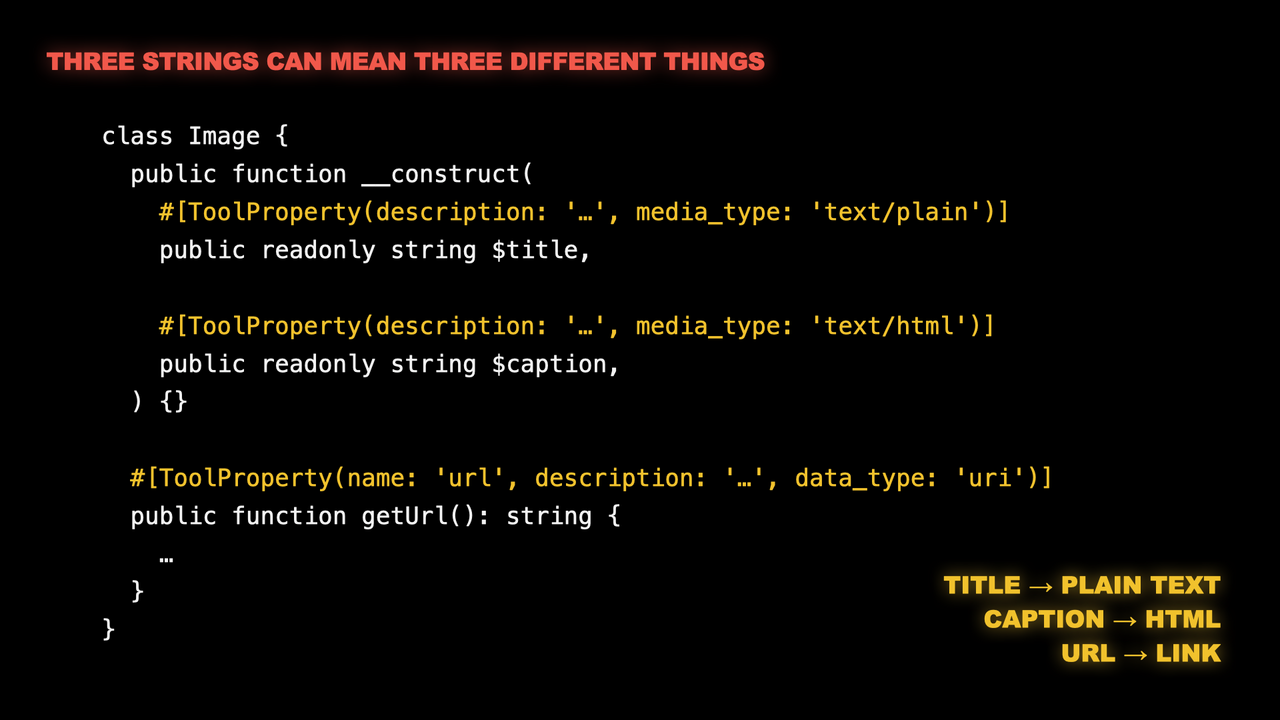 A slide from my DrupalCon Rotterdam 2026 keynote: all three values have PHP's
 string type, but #[ToolProperty] attributes describe the title as plain text, the caption as HTML and the URL as a URI.Tool API only includes the photo properties I explicitly describe with #[ToolProperty]. The attribute can go on a public class property or a getter method. On getUrl(), it exposes the returned value as a photo property named url; it doesn't make the getter a callable tool.
Under the hood, Tool API uses Drupal's Typed Data API to represent these descriptions and can generate JSON Schema from them.
Drush, MCP, ECA, FlowDrop, Maestro and my album module's custom HTTP route can all call the same runner, ToolRunner::run(). That means the same permission checks and input validation apply whichever way a tool is called. The runner also distinguishes invalid input from denied access or an execution failure, so each integration doesn't have to work that out for itself.
As mentioned, PHP attributes aren't the only way to define a tool. A dedicated plugin class is a bit more verbose, but it has some advantages. For example, it doesn't have to live in the module it exposes. A separate module can define the tools and call the original module's services and APIs, with no changes to its code. Tool Belt currently takes that separate-module approach for Drupal Core operations, like creating content and updating fields. That means we can add tool support for existing modules without waiting for their maintainers to adopt Tool API.
If you maintain a module, try exposing one useful operation as a tool. If you get stuck, or Tool API can't describe the data you need, open an issue. Your feedback can help us improve Tool API before its first stable 1.x release. Tool API is still young, so you can help shape it.
AI assistants can handle complex tasks without developers
I actually started with search. A while ago, I exposed my blog's search to AI agents and wrote about it several times: as an MCP tool, through an API catalog and with Agentic Resource Discovery. That code started out custom, but I've since updated it to use Tool API as well.
Later, I added the album tools. My album module provides seven. The ones I use most are find_images and get_image, which find and read photos, and update_image, which changes a photo's title, caption or alt text.
I've used these tools to write titles and alt text for whole albums. Here are a few other things I ask an assistant to do:
- Find every photo that still has no alt text, across all albums, and suggest alt text for me to review.
- Find typos or grammar issues in my captions.
- List the photos in an album that have no title, and suggest titles for me to review.
The album tools and find_posts often work together. If I have an album from a trip and a blog post about the same trip, an AI assistant can call find_posts while it writes alt text for the album's photos, and use the post as context. It picks up details such as where we went, who was there and what the trip was for. The alt text gets better, without me having to point the assistant at the post.
My album module's admin screens can't do any of these tasks quickly, and some tasks have no screen at all. Before these tools, I either had to run SQL queries on the database or didn't do the task at all. To fix missing alt text, I'd query for the photos without it, then open each photo's edit screen in a browser. Updating dozens of images that way gets tedious.
Now an assistant finds the photos and drafts the alt text, and I review and approve its suggestions in Claude. It's at least 10 times faster than my old workflow.
I've been writing SQL for nearly 30 years, so I could always do these jobs myself. Many site owners can't. They ask a developer for help, or the job never gets done. Tools can remove that dependency. Photos are just my example. Any operation a module exposes as a tool becomes something a site owner can ask for directly, without waiting for a developer.
AI assistants can handle complex tasks without dedicated UIs
When an assistant calls get_image, it gets the photo's properties and the photo itself, so it can see what it's describing. In Claude, an interface I built also displays the photo in the chat. It uses MCP Apps, an MCP extension that lets a server provide an HTML interface the client renders in the conversation.
Every module has tasks that are too rare or too specific to justify a screen of their own. A maintainer can build screens for everyday work and make rare or specialized tasks available through tools. I've already removed parts of my album module's interface, like the button that generated alt text with a language model, because an assistant now does that job. I expect to remove more.
Shared descriptions can also make it easier to tailor interfaces to the people using them. Tool API can already generate a form from a tool's inputs and apply the same validation constraints when the tool is called without a form. Michael Lander is exploring this further in his Data Surface prototype, where forms and tools use the same definitions of accepted values and validation rules.
An organization could build admin screens around its own workflow while reusing those definitions and validation rules. With the right prompting, assistants can already build interfaces around these tools. For a batch of photo updates, that could be a table of images and proposed alt text where I can review and approve the changes. Over time, I expect assistants to recognize when an interface would help with a task and build one without being asked.
Michael's work builds on Drupal's configuration validation, and it is a good example of what I mean when I say Drupal has an accidental AI advantage. Wim Leers began advocating for configuration validation in 2022. AI wasn't part of his case. Years later, Michael can reuse those validation constraints to power forms and tools from one definition, and in Validation-first, Wim describes how the same precision helps AI tools generate valid Drupal Canvas code components.
JavaScript front ends can use the same tools as AI assistants
But that is not all. With my album data and operations described, I decided to make the same data and tools available to front-end developers. I wrote two pieces of connecting code: a shared HTTP route that calls read-only tools, and a generator that produces an OpenAPI document from their definitions. Together, they take under 150 lines of PHP.
The route uses the URL to identify the tool and the query string to supply its arguments. For example, a request to /api/find-images?query=ski calls find_images with ski as its query and returns the result as JSON. I didn't write another photo search or a separate route for each tool.
The auto-generated OpenAPI document, available at https://dri.es/openapi.json, describes those endpoints, their parameters and their responses. It uses the same #[ToolMethod] and #[ToolProperty] attributes the MCP tools use.
OpenAPI is a 15-year-old standard for describing HTTP APIs, so it's supported by many developer tools. Swagger UI, for example, lists my endpoints and lets you try them. This video shows the document, then Swagger UI reading it and calling the API for "driesnote":
Many front-end developers use TypeScript, which adds static types to JavaScript. A type can describe an image as an object with a string alt and a string title. The TypeScript compiler checks the code against those types before it runs, and editors like VS Code show type errors as you write.
To see what this gives a front-end developer, I asked Claude Code to build a small React app that searches my photos from the browser. The app knows nothing about Drupal, and building it didn't require any Drupal knowledge either. All Claude Code had was my site's URL and its generated OpenAPI document.
I'm not a front-end developer, so it was interesting to watch. Claude used a code generator called openapi-typescript to turn my OpenAPI document into TypeScript types in under a second. A small library called openapi-fetch then uses those types, so the compiler can check the request paths and parameters in the app's code.
The whole app is a single React component of 45 lines, and I wrote no additional Drupal code for it. In this video, it searches for "driesnote":
The HTTP route and OpenAPI generator are prototype code on my site. Nothing in them is specific to photos, so they shouldn't be something each site or module has to write. They belong in shared infrastructure that works for any module's tools. JSON-RPC is one place that could happen: if JSON-RPC supported Tool API, it could expose tools from other modules without each module writing its own JSON-RPC integration.
Workflows can call module operations as tools
Inside Drupal, ECA, FlowDrop and Maestro can call tools as steps in a workflow. The ECA Tool module, for example, makes tools available as ECA actions.
In the keynote, Shibin Das showed a FlowDrop workflow he built with my album module's tools. It searches my photos and lists my albums, first without any AI, then with an agent that decides which tools to use:
Workflow systems can also expose tools of their own. ECA calls its workflows "models", and the ECA Tool module exposes each Tool event in a model as a separate tool. One model can therefore offer several tools. Maestro can expose public workflow templates as tools, using their variables as inputs.
A workflow that is also a tool can be used like any other tool. A Maestro workflow can call a tool exposed by ECA, through the same Tool API integration it uses to call my photo search. Neither system needed a direct integration with the other. I still find that a little hard to get my head around, but I love it and see the potential.
Automation platforms outside Drupal need a way to call those tools too. Last year, Jürgen Haas and I built the Orchestration module to connect Drupal with Activepieces. It lets Activepieces call tools defined through Tool API, run AI agents and trigger ECA models, while events in Drupal can trigger workflows in Activepieces. I described that setup in Connecting Drupal with Activepieces. Other platforms can call Drupal's tools over MCP, for example through n8n's MCP Client node.
Tools compose. An assistant can combine them in a single task, a workflow can chain them, and a workflow can be one of the tools in another workflow. Once a system can call Drupal's tools, it can reuse that connection for operations from different modules.
That is the orchestration shift: a stack becomes a network, and workflows coordinate work across applications. Drupal can be a node in that network, with its modules offering operations that other systems can call. For agencies building those workflows, Tool API makes Drupal's capabilities available as reusable steps.
Drupal components can share data descriptions
So shared descriptions help JavaScript front ends and other applications use Drupal's data, but they can also help Drupal's own rendering system, even when no AI assistant or external application is involved.
My photos are rendered using Single Directory Components, or SDCs. Each component keeps its Twig template, CSS and metadata in one folder. Its .component.yml file declares the component's inputs, called props, and describes the data they accept.
My album module already describes a photo's properties with #[ToolProperty] attributes. I was also maintaining descriptions of those same properties in each photo component's .component.yml file. When I changed what a photo property contained, I had to remember to update both descriptions.
So I wrote a Drush command that reads the PHP attributes and generates a shared schema.json file. My album module's generated photo schema describes properties such as alt and caption: their types and what they contain. Each photo component's .component.yml file now references that shared description instead of describing those properties again. When I change what a photo property contains, I update its PHP attribute and run the command.
Moving the descriptions into a shared file creates a new problem. Anything that reads a component's .component.yml now finds a reference to schema.json, not the property definitions. A tool that builds a component catalog, showing what data each component expects, has to find and resolve that reference itself. Core's component API doesn't do it for them: it returns the reference without the photo's property definitions.
Pierre Dureau's merge request in Core issue 3352063 addresses that gap, though it isn't merged yet. With it applied on my site, Core's component API followed the reference and loaded the photo property definitions, without any changes to the schema file.
That matters for generative UI. Frameworks like OpenUI and A2UI let an AI agent assemble an interface from a catalog of components, so they need to know which components exist and what props each one accepts. With this change, an integration could build that catalog from Drupal's API instead of writing its own reference resolver. Tools that read the component files directly still need to learn to follow these references. The SDC add-on for Storybook, a tool for developing and previewing components, doesn't yet follow the Drupal-specific references I use.
The same goes for the generator. Other module maintainers shouldn't each have to write one like mine. My experiment uses Tool API's property descriptions, but describing data and generating schemas are useful beyond tools. Some of that support could belong in Drupal Core, benefiting both SDC and the Icon API, which uses JSON Schema to describe icon settings such as size and color.
My approach only covers components built to render my module's photos. General-purpose components define their own inputs and still need a way to get Drupal's data. Drupal describes entity fields with Typed Data, while SDC describes props with JSON Schema. UI Patterns already handles much of the work between them, including which data sources can supply a prop. Rosetta should build on that work too.
Make shared descriptions standard practice
The same photo descriptions and operations now support AI assistants, a React app, workflows inside and outside Drupal, and Drupal components.
I want more module maintainers to adopt Tool API: describe their modules' data once and expose useful operations as tools. That should become a normal part of developing and maintaining a Drupal module.
We should also provide the HTTP integration, OpenAPI generator and component schema generator as shared Drupal infrastructure. Module maintainers shouldn't each have to write that connecting code.
My prototypes show this working for one module. Rosetta is about making that reuse work across Drupal. We need to work with the relevant maintainers and Core committers to decide what belongs in Tool API, its integrations and Drupal Core.
If you maintain a module, try exposing one useful operation as a tool and using it with another system. Share what worked, and open an issue when you find something Tool API can't describe or do.
Thanks to Jamie Abrahams, Mateu Aguiló Bosch, Ronald te Brake, Shibin Das, Pierre Dureau, Matt Glaman, Jürgen Haas, Marcus Johansson, Randy Kolenko, Michael Lander, and Fons Vandamme for reviewing this post.
19 Oct 2026 3:16am GMT