27 Oct 2026
 Planet Mozilla
The Mozilla Blog: Skip the busywork with Smart Window
The days might be getting shorter, but your to-do list is only getting longer. Whether you're getting a head start on holiday shopping or planning your next career move, Smart Window's newest features will help you keep up.
Firefox's opt-in AI browsing experience can now use information from tabs you choose to help fill out forms. It can also watch web pages and notify you about specific changes you've asked it to track.
Let your open tabs fill in the blanks
Job applications ask for your work history; event registrations ask for a professional bio. If those details are already in your open tabs, Smart Window can now use pages you choose to suggest what to enter, saving you extra clicks and some Ctrl+C, Ctrl+V.
For example, Smart Window could use information from your online portfolio or professional profile to fill in your work history, or draw on those details to draft an answer to a question like "Tell me about a time when…" Firefox's regular autofill still handles saved information such as your name and address, which can be entered directly into forms without relying on AI models.
To get started, click into a form field. If the form has at least four text fields that Smart Window can help fill, you'll see "Fill from sources" appear in the dropdown, along with a recommended source page. Select "Fill from sources" to continue, or click the pencil icon to open "Edit sources" if you want to change or add tabs. Once you've chosen your sources, review the suggestions before filling out the form. You can edit the results before submitting; Smart Window won't submit the form for you.
When you choose to use this feature, information from your selected source pages is shared with Gemini 3.1 Flash Lite, the AI model used for detecting the fields and extracting relevant information from your selected tabs. Your model choice for Smart Window chat stays the same, and saved autofill values stay on your device. Learn more about how form filling works.
This feature currently supports text fields on web forms and does not save any generated form fill data. We're exploring support for more field types, including dropdown menus, as well as PDF forms and ways to save and manage generated information for future forms.
Give your refresh button a break
A watched pot never boils, and refreshing a web page won't make an update appear any sooner.
Smart Window can now watch a page for a specific update, whether that's an item going on sale or a new job listing that includes a job title or company name that you're following. Each task can follow up to five pages, so you can keep an eye on several stores or job boards at the same time.
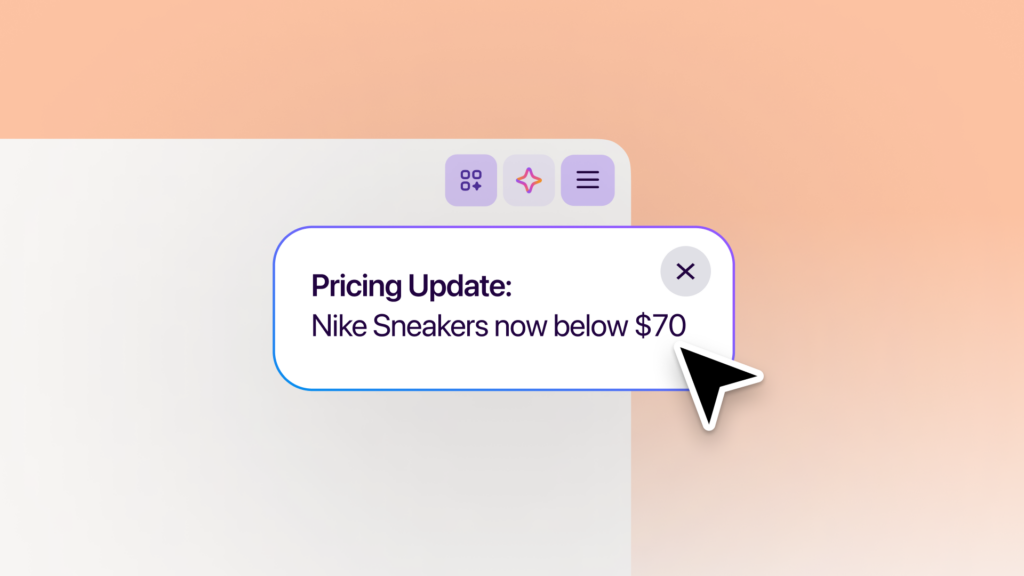
Type "/watch" in the Smart Window chat to set up a task. Describe what you're looking for, add the pages to watch, and choose whether Firefox should check for updates on a daily or weekly basis. Those checks run only while the browser is open.
When there's a match, you'll see an update through the Tasks button in the toolbar. With desktop notifications enabled, Firefox can also notify you directly; click the notification to open the watched pages. You can have up to 15 active tasks at a time, and you can edit, pause or delete tasks. Smart Window will automatically pause tasks after 60 days without a matching change. If 90 days pass without a change, it will stop checking altogether.
Page monitoring uses the Qwen AI model to identify changes that match what you're looking for. Your model choice for Smart Window chat stays the same. Learn more about creating and managing tasks.
Try the latest additions
These two new features are available in the Smart Window beta on desktop, in English in the U.S. and Canada, and will roll out to additional markets in the coming months.
Try Smart Window and share your experience on Mozilla Connect. We'd love to hear how you're using Smart Window to get things done and what you'd like it to help with next.
The post Skip the busywork with Smart Window appeared first on The Mozilla Blog.
27 Oct 2026 1:00pm GMT
The Mozilla Blog: Five Firefox updates you might have missed, and a look ahead
Some of our latest Firefox updates have had big moments of their own, from the launch of our new design and built-in ad blocking on iOS to Firefox Enterprise and our partnership with NVIDIA GeForce NOW. You might've even spotted a few familiar internet OGs in our latest campaign. Other improvements might've flown under the radar until you open a PDF or move your tabs around.
We wanted to take a moment to highlight some of the features and improvements we've been working on, from recent additions you might have missed to a look at what's coming next.
What's new in Firefox
- Open PDFs faster. Firefox's built-in PDF viewer now starts up to 45% faster on desktop, so there's less waiting when you open a document in your browser.
- Put your Android tabs where you want them. Prefer your tabs at the bottom of the screen? You now have the option to move Firefox's tab bar there. Go to Settings > Customize to choose.
- Find your spot in a video faster. We've made it quicker to jump to a different point in a video on desktop, whether you're skipping ahead in a tutorial or going back to catch something you missed.
- Keep your favorite wallpapers handy. Firefox now saves a collection of your custom wallpapers under "Your images" on New Tab on desktop, so you can switch between favorites without uploading them again.
- Save time filling out forms and keeping up with page changes. Smart Window can now help fill out online forms using information from your chosen tabs, so you don't have to copy details back and forth. You can also ask it to watch a page and notify you when something changes, like a price drop or a new job listing, saving you from manually checking for updates. Both capabilities are available in English in the U.S. and Canada as part of the Smart Window beta. Learn more about the new features here.
What's next on the Firefox roadmap
When we launched our public roadmap in June, we shared plans to make everyday browsing more useful, flexible and private. We've now updated it with more of what's ahead. We're developing these features in the open, in close partnership with our contributors, and will share more about release timing as each feature gets ready for more people to try.
Here's a look at what's in the works:
- Keep what you need in view. We heard your request for a way to keep a page visible while browsing. Mini Window will let you pop a tab, or part of a page, into a small floating window, so recipes or instructions stay in view while you work in another tab.
- Listen to pages. Give your eyes a break. Firefox will soon read articles and other web content aloud on desktop and Android, so you can listen while doing other things - even with your phone's screen off.
- Take your reading offline. No connection? No problem. Offline mode on Android will let you save articles ahead of time to read or listen to without internet access, perfect for flights and commutes with spotty service.
- Turn speech into text on desktop. We're bringing speech recognition to Firefox on desktop, so websites that use Firefox's built-in capability can offer voice input and captions without sending your audio to a server. Those sites receive the text, while your audio stays on your device. After downloading the speech recognition model, transcription will work offline, too.
- Choose how VPN works for each site. Since bringing free built-in VPN to Firefox on desktop and Android (iOS coming soon), we're now adding the ability to set website rules so you can choose how VPN works on a site-by-site basis.
- Clear browsing data directly from your toolbar. We're bringing Private Window's familiar
 button to Classic Window on desktop, so you can quickly choose what browsing data to delete without digging through settings.
Keep shaping Firefox with us
Try the latest updates and explore the Firefox roadmap for more of what we're working on. If there's something you're looking forward to, or something you'd like us to improve, tell us on Mozilla Connect. Your feedback helps shape what comes next.
The post Five Firefox updates you might have missed, and a look ahead appeared first on The Mozilla Blog.
27 Oct 2026 1:00pm GMT
Mozilla Open Policy & Advocacy Blog: A Reason for Optimism on US Competition Policy
Mozilla has long called for US antitrust reform in digital markets. After several false starts, real change has yet to materialize. In the meantime, dominant tech players have further entrenched their hold, limiting choice and degrading people's experiences. Integration of new AI services into existing ecosystems is enabling those same companies to perpetuate and accelerate that power.
But, there's reason for optimism. Momentum is again building toward antitrust reform, and this time feels different. With support from start ups, middle tech challengers, civil society, and think tanks across the political spectrum - and most importantly, legislative champions in Congress - it's clear that the time is coming.
This is a debate about how the largest tech companies control the products and innovations in the market, and access to the services the people use every day. At the center are questions about user choice, interoperability, privacy, security and whether independent innovators have an opportunity to compete on merit.
These topics were the focus of a recent Senate briefing hosted by Bull Moose Project and Public Knowledge, diving in on three competition bills before the Senate Judiciary Committee: The American Innovation and Choice Online Act (AICOA), the Open App Markets Act (OAMA), and the America Act. The discussion brought together policy experts and industry voices, including Mozilla, to explore how competition policy can improve people's experiences online and the ability of challenger companies to succeed.
The conversation covered a range of issues, from whether existing antitrust laws are equipped to address today's digital markets, to misguided claims about what might happen if we pass antitrust reform, and the ways that dominant platforms dictate how people discover and use competing products. For Mozilla, an important part of the conversation is what meaningful user choice looks like in practice. People should be able to choose alternatives, and those choices should be respected. But structural barriers can make it harder for independent players to compete on merit, and for people to access options, including independent products that innovate in areas like privacy and security. Competition creates stronger incentives for companies to build better, and to give people the protections and products that they deserve.
Antitrust reform is not about punishing companies for being successful. It's about ensuring that independent players can provide the best possible versions of their products, and that people can truly benefit from those innovations. That's why Mozilla, alongside many others, has long championed AICOA and worked to tackle longstanding anticompetitive practices. We're excited to see newly energized support across the public and private sector, and for the next steps in advancing legislation.
The post A Reason for Optimism on US Competition Policy appeared first on Open Policy & Advocacy.
27 Oct 2026 12:05am GMT
26 Oct 2026
Planet Mozilla
Mozilla Addons Blog: Developer Spotlight: Profile Manager Pro
If your online activities involve logging in and out of a lot of different accounts - often on the same website - Profile Manager Pro can be a time-saving game changer. The extension provides a one-click login process for multiple online accounts, so you can effortlessly jump between profiles. From social media management to web development, QA testing and more, Profile Manager Pro removes the painstaking friction of constant account switching.
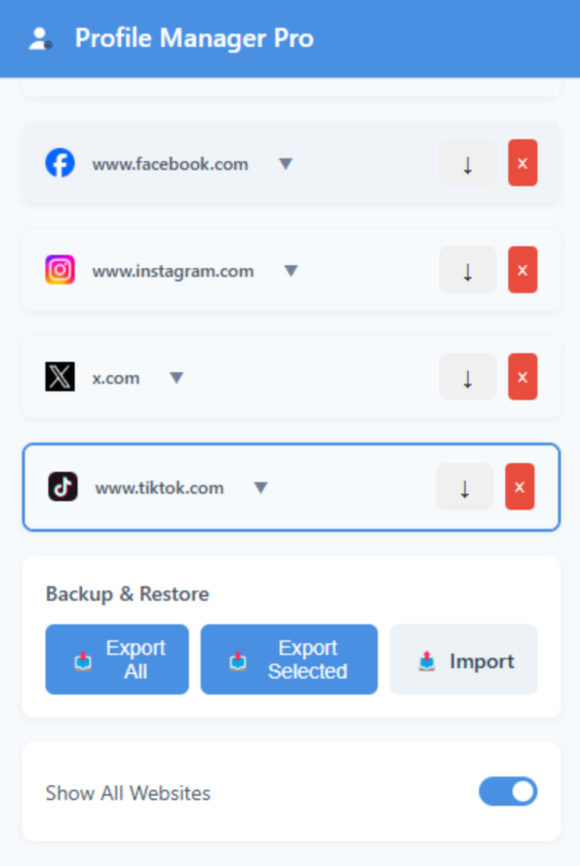
Simple UI makes it easy to jump between multiple accounts across various sites.
"One of the most interesting aspects of developing Profile Manager Pro is realizing how many different workflows can benefit from efficient account switching," explains its creator, Islam Elsayed. Consider developers who need to save sessions for different roles, such as admins, moderators or regular users, to test functionality; freelancers working across multiple client dashboards; or support professionals investigating account-specific behavior. The potential uses for Profile Manager Pro are practically limitless.
Elsayed makes clear that Profile Manager Pro isn't intended to replace Firefox's full browser profiles; rather, the aim is to make it easier to save, organize, and restore individual website sessions within a browser environment. "I think that distinction is important because it illustrates how browser extensions can complement existing browser capabilities by addressing very specific everyday frustrations."
While the extension provides a fairly straightforward function, its design and development were anything but simple. Elsayed says his biggest development hurdle was creating a reliable account-switching experience across websites that handle authentication and session management differently. Modern websites often use tangled combinations of cookies, browser storage, authentication tokens and other complex security mechanisms. A technical solution that works perfectly on one website may not function at all on another. "These challenges taught me an important lesson: The best productivity tools often hide considerable technical complexity behind a simple user experience."
Another challenge is balancing functionality with user privacy and security. Session-management extensions interact with sensitive browser data, so Elsayed goes to great lengths to ensure user protection - starting with a local-first approach to development. Saved session information stays within the user's browser environment by default. Users don't need to create a Profile Manager Pro account or send their browsing sessions to a third-party server. The extension also offers optional encrypted Google Drive sync, providing even more control over stored data.
"Responsible session management is essential," says Elsayed. "This is why I believe privacy should be considered throughout the design process rather than an afterthought. Ultimately, my goal is to give users convenience without requiring them to surrender unnecessary control over their data."
As for future development plans, Elsayed frames Profile Manager Pro as an "evolving project." He intends to focus on optimizing the profile management system and improving backup and sync experiences.
"My long-term vision for Profile Manager Pro is to become an increasingly powerful yet lightweight tool for managing online identities and workflows," says Elsayed. "I believe thoughtful improvements based on real user needs are more valuable than adding features simply for the sake of adding them. For me, the most rewarding part of development is solving those complex problems so users don't have to think about them."
Do you have an intriguing extension development story? Do tell! Maybe your story should appear on this blog. Contact us at amo-featured [at] mozilla [dot] org and let us know a bit about your extension development journey.
The post Developer Spotlight: Profile Manager Pro appeared first on Mozilla Add-ons Community Blog.
26 Oct 2026 10:24pm GMT
The Rust Programming Language Blog: How to fund Rust contributors
TLDR:
- To fund general maintenance, donate to the Rust Foundation Maintainers Fund or sponsor the RustNL Maintainers Team
- To fund specific features and improvements, sponsor fundable Rust Project Goals
- To fund individual contributors, donate to their GitHub Sponsors accounts
There is always so much to do in the Rust Project! New features to implement, bugs to fix, performance optimizations to make, issues to triage… It takes a lot of work to keep our high bar of quality while also shipping new features and improvements. And the workload keeps increasing with the continuous growth of Rust adoption.
As is unfortunately common in open source projects, a large fraction of that work is currently done by volunteers. That causes various issues, such as people burning out or complex features taking many years to ship.
Unsurprisingly, one of the best ways to help improve that is to get more people who work on Rust funded! This year, several funding initiatives started ramping up, and we already experience many positive effects. They helped us improve the maintenance status of critical Rust projects and make significant progress on several long-awaited features, such as allocators, the never type, the next trait solver or the Polonius borrow checker. However, only a fraction of people working on Rust are currently funded for their work.
We know that there are Rust users, both individuals and companies, who would like to help improve Rust by funding it, but it might not always be obvious how exactly to do that. This post thus provides suggestions on how you can support the development of Rust in three ways.
If you're unsure which option fits, or would like to discuss funding on behalf of your company, please contact the Funding team.
Fund general maintenance
Maintenance is a continuous process required to keep Rust (or any software project for that matter) working. It consists of two main activities. The first is general housekeeping, such as ensuring that Continuous Integration works, dependencies are kept up-to-date and issues, bugs and security incidents are promptly triaged and resolved. The second is performing refactorings and code reviews, which ensures that the codebase will be able to evolve and continuously ship new features, without accruing extensive technical debt.
Having quality maintenance is crucial for the long-term health of Rust, yet it is typically very difficult to find funding for it; funders often want to sponsor specific new features, rather than just "keeping the lights on". However, without sufficient maintenance, it becomes much more difficult, and much slower, to ship new features. Improving the maintenance of Rust thus also helps us ship features and improvements faster, though the effects are sometimes only observable over longer periods of time.
Funding maintenance is a great choice if you want to let us decide how best to improve Rust. The Rust Funding team continuously looks for Rust teams and projects that require help with their maintenance efforts, and allocates available funds to Rust maintainers who could help improve the situation.
To fund Rust maintainers, consider donating to the Rust Foundation Maintainers Fund or sponsoring the RustNL Maintainers Team.
Fund specific features and improvements
There are always many Rust improvements and new features that are in progress. We track some of those initiatives through Rust Project Goals. Each Goal describes a specific improvement to Rust: what it is, who is going to develop and drive it forward and which Rust teams are willing to help reviewing and maintaining it.
Some of those Goals are looking for funding. Either to help their owner dedicate time and focus to push the given feature forward, or to fund maintainers who will perform refactorings necessary to unblock that feature and review its implementation. Often funding is required for both. When a Goal is properly funded, the probability that it will achieve its milestones is much higher, which then translates in the given improvement being shipped sooner to Rust users.
Funding Project Goals is a great choice if you want to help push forward specific Rust features or Rust toolchain improvements that will benefit you or your company.
To fund contributors working on Project Goals, consider taking a look at Goals that need funding and reaching out to their funding contact. If in doubt how to proceed, reach out to the Rust Funding team.
Fund individual contributors
There are hundreds of people in the Rust Project who continuously work on improving Rust. Some of them have personal fundraising profiles (e.g. on GitHub Sponsors), which allows you to support them directly.
There might be various reasons for supporting a specific person. Maybe they are maintaining a crate that you love to use, maybe you like reading their blog posts, or maybe you are simply a fan of the work that they do. Whatever the reason, we are sure that they would appreciate your support!
Funding individual contributors is a great choice if you want to directly support Rust contributors whose work you appreciate.
To fund individual Rust contributors, check out their GitHub profile or personal website to see what options there are for supporting them. You can also examine our list of Rust Project members who can be supported through GitHub Sponsors[1].
Conclusion
We hope that this post is useful to anyone who would potentially like to invest funds into making Rust better. You can also find a shortened version of the "how to fund Rust guide" at the Funding page of the Rust website, or check out a RustConf 2026 talk by Niko Matsakis about how Project Goals and their funding works.
If you are a company looking to fund the development of Rust, consider joining the Rust Commercial Network. Joining the network is free, and Rust Foundation membership is not required. It can help you find opportunities for funding improvements in specific areas related to Rust usage (e.g. user interfaces, language interop, supply chain security, etc.) and collaborate on funding Rust development with other companies.
There are of course other ways of helping Rust other than donating funds. For example, you can check out Project Goals that are looking for contributors or more generally check our contributor onboarding guide. Companies can also help by giving employees paid time to contribute upstream, or by hiring Rust contributors to do that work. One possible model is the Engineer in Residence role, that was recently established in the Rust Foundation.
-
Note that this list is not exhaustive; there are some Project members who accept donations through GitHub Sponsors (or another fundraising platform), but did not opt into being listed on this page. ↩
26 Oct 2026 12:00am GMT
25 Oct 2026
Planet Mozilla
The Mozilla Blog: Firefox reunites meme royalty to remind you what the internet used to feel like
A group of familiar faces from the early web just got back together to ask an important question: What happened to the internet?
Sure, there was a time when it was a little less polished, and a lot less speedy, but it was yours. Overly Attached Girlfriend may have wanted to know everything about you, but your browser didn't need to. Dancing Matt boogied all over the world, without any corporations tracking him or selling his personal data. And while Annoying Orange is incredibly annoying, he's not as annoying as forced AI features.
These beloved early internet personalities remind us of a time when surfing the web felt open, organic, and most importantly, personal. And good news: With Firefox, it still can.
That's why we're teaming up with these icons to remind people what our browser offers, and show those who wandered off why now is the time to come back.
The team behind the comeback
For Mozilla Chief Marketing Officer John Solomon, the aim of the campaign started with winning back people who originally loved and used Firefox.
"I kept going back to Firefox's heyday, when the internet was really fun, weird, and interesting. The challenge was: how do you lean on nostalgia and heritage, but not be stuck in the past?"
The campaign was created by We Believers, one of the world's most awarded independent agencies, with production handled by nobodys and direction by the Sunny Sixteen collective.
"We wanted to create an idea that truly belongs to Firefox - a challenger browser that helped shape the internet's golden years and stayed independent as Big Tech took over. The goal? Remind former users that what they loved about Firefox matters more than ever now," said Gustavo Lauria, Founder and CCO at We Believers.
Solomon said the finished campaign achieves the goal of embracing Firefox's history without living in it: "Our partners really cracked it. We wanted to remind people of what made the internet so wonderful in the first place. These are people who helped make it strange, creative, surprising, and fun. None of them were trying to go viral. They were normal, everyday people who were using the internet. That's the way the internet should be and why we feel it's a great moment for Firefox. Always independent and unlike big tech, not trying to extract more from everyday people."
The internet you remember is still out there
Whether you used Firefox back in the day, or are simply looking for a better browsing experience, we're still here, staying true to the values we were built on. We believe the internet should be open, accessible, and shaped by the people who use it, not just the platforms that profit from their attention and data.
This means a web where you can explore without feeling tracked or used for profit, where you decide for yourself how new technology fits into your life, and you can trust that your browser protects you by default. Firefox has built-in privacy protections to help limit tracking, lets you decide if AI features appear and customize how they behave, and uses open source code that anyone can see. To learn more about what sets Firefox apart, check out five reasons to choose the browser that puts you first.
We know a better internet isn't built by finding new ways to capture your attention or information. It's about giving you more freedom to make the web your own.
The web is yours to explore
The internet has changed a lot since Numa Numa Guy first danced his way into our collective memory. But the things that made it magical - creativity, curiosity, community, and the freedom to explore - are still worth protecting.
Firefox has championed those values since the beginning, and we're not giving up on them now. That's why we're celebrating the people who helped make the early web what it was, while reminding everyone that a more open, human internet is still an option.
The early days of the internet may be behind us, but the spirit doesn't have to be. Experience it for yourself. Now more than ever: come back to Firefox.
The post Firefox reunites meme royalty to remind you what the internet used to feel like appeared first on The Mozilla Blog.
25 Oct 2026 11:58am GMT
22 Oct 2026
Planet Mozilla
Firefox Tooling Announcements: Firefox Profiler Deployment (October 22, 2026)
The latest version of the Firefox Profiler is now live! Check out the full changelog below to see what's changed:
Highlights:
- [fatadel] Make CompositorScreenshot markers schema-based (#6261)
- [fatadel] Expose and clear URL-imported call tree search in the CLI (#6387)
- [Markus Stange] Make the scrollable editor view in the source view cover the full height of the panel, even if the source code is short. (#6405)
- [Nazım Can Altınova] Add `-js-sources-from-func-names` to `profiler-edit` (#6394)
- [fatadel] Use fractional seconds with adaptive precision for CLI marker timestamps (#6384)
- [Markus Stange] Switch to TypeScript 7 (tsgo) and replace ESLint with oxlint (#6354)
Other Changes:
- [Nazım Can Altınova] Fix the upload progress bar not showing in light mode (#6348)
- [fatadel] Bump profiler-cli version to 0.12.0 (#6416)
- [fatadel]
 Sync: l10n → main (October 22, 2026) (#6415)
 - [Markus Stange] Some preparations for a function list panel (#6401)
- [Nazım Can Altınova] Look for a source file's address proof in all of its frames (#6407)
- [Nazım Can Altınova] Silence profile loader logs in profile-querier-url tests (#6409)
- [Markus Stange] Use inverted transforms in the tests for inverted call node paths. (#6393)
- [Markus Stange] Accept more fields from symbolication. (#6373)
- [Markus Stange] Support index source maps. (#6399)
Big thanks to our amazing localizers for making this release possible:
- el: Jim Spentzos
- uk: Lobodzets, uya2521, Іhor Hordiichuk
Find out more about the Firefox Profiler on profiler.firefox.com! If you have any questions, join the discussion on our Matrix channel!
1 post - 1 participant
22 Oct 2026 5:01pm GMT
Firefox Nightly: Three Cheers for Volunteers! – These Weeks in Firefox: Issue 211
Highlights
- Here are some big-ticket volunteer contributions this week:
- Thank you to volunteer contributor Cornelius, who made console evaluation able to re-declare let and const variables in our DevTools!
- Thank you to F3tch, who landed several patches to allow setting of camera and microphone permissions, reject zero-sized screenshots, and add a vendor-specific WebDriver BiDi command for listing installed extensions, as well as update cookie test expirations.
- Thank you to SMRehan, who landed a (disabled by default) mode that lets Picture-in-Picture open when the browsing window is occluded (as opposed to when changing tabs).
- This can be tested by setting media.videocontrols.picture-in-picture.enable-when-occluded.enabled to true
- In Nightly 160, we have enabled the playback speed feature for Picture-in-Picture by default:
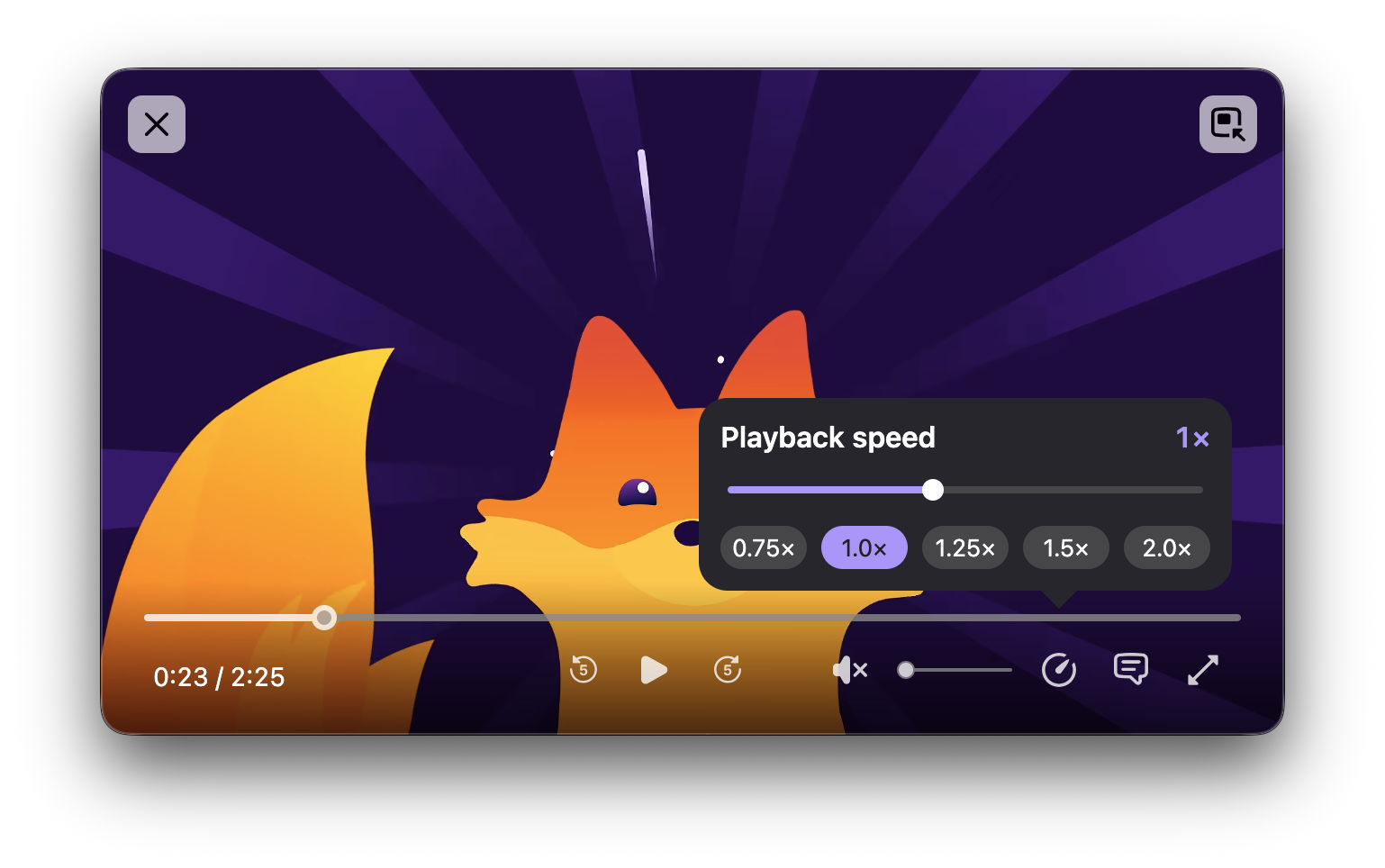 Thank you to volunteer contributor Simon Rosen for the bulk of the initial work on this!
- The custom wallpaper library for newtab is now available, starting in Firefox 158, so you can now store multiple custom wallpapers:
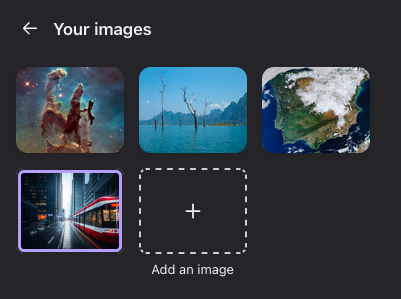
Friends of the Firefox team
Resolved bugs (excluding employees)
Script to find new contributors from bug list
Volunteers that fixed more than one bug
- :Vincent
- Amadi
- any1here
- Duncan McIntosh [:dmcintosh]
- f3tch [:f3tchcodes]
- ianlewisuk1
- Ivan Smagin
- Khalid AlHaddad
- Logan Rosen [:Logan]
- Mayank Bansal
- Vir Patel
New contributors (🌟 = first patch)
- Ahmed ElGendy: Add a `(inline-)grid-lanes` badge in the markup view for element with display: (inline-)grid-lanes
- Mubashshir: Extension icon missing in old sidebar switcher
- Anton Bershanskyi: Introduce browser.runtime.PlatformArch.ARM64
- Amadi:
- Caleb Pickard: New sidebar revision does not have "By Most Visited" as a sort option for History
- Daniel mungai chege: Add autocomplete for CSS random()
- dchen705: syntax and handling of async runtime.onMessage listeners is confusing
- Diego: Pressing ctrl+shift+numpad1 causes tab to be moved to end of tab list regardless of NumLock
- f3tch [:f3tchcodes]:
- "WebDriver:TakeScreenshot" doens't throw "unable to capture screen" error if height or width of captured image is 0
- Increase expiry date range for network cookie tests
- [wdspec] ValueError: "list.remove(x): x not in list" for "self.event_listeners[name].remove(fn)"
- [firefox-devtools-mcp] Support webextensions.moz:listExtensions command in WebDriver BiDi
- Allow "permissions.setPermission" and "WebDriver:SetPermission" to set camera and microphone permissions
- Ole Baumann [:darkintaqt]:
- ianlewisuk1:
- Jakub Stasiak [:jstasiak]: Early WebSocket messages can be missing in the Network tab
- Jaron: Show the remote control stripe on the address bar only
- 🌟 Lavindeep: Subprocess fcntl binding is not variadic, causing incorrect pipe flags and possible native-host launch failures on Apple silicon
- 🌟 Sho Sakuma: Fix WP_WIN and WP_MACOSX typos in LaunchChild's #endif comments
- Raúl: Remove dead PanelUI-fxa-menu-setup-sync-container from the account menu
- 🌟 Jason Salerno: Remove the unused tooltip attribute from the urlbar view markup
- Ivan Smagin:
- Nazeer Ahmed Shaikh: Instrumentation tests on artifact builds do not check `object` metric schema
- Vir Patel:
- Valerie Racine (:v-racine): The corrupt_file telemetry metric counts unrecognised session file read errors as healthy files
- 🌟 Yeet: Saved tab groups not actually saved if browser crashes
Project Updates
Add-ons / Web Extensions
Addon Manager & about:addons
- Removed the colorway migration code and the about:addons UI informing users about colorways on AMO - Bug 1990883
- Thanks to Jason Birchall (from AMO engineering) for collaborating with us on this.
- As part of about:addons Nova restyling followups
- Parameterized the built-in theme preview images, and fixed the default theme previews rendering with the wrong colors when about:addons uses the opposite color scheme (regression introduced and fixed within Firefox 158) - Bug 2070289 / Bug 2074428
- Thanks to Emilio Cobos Álvarez for driving the theme preview parameterization.
- Fixed the Nova theme preview gradients being mirrored in RTL locales - Bug 2073245
- Hid the (non-localized) theme card descriptions in the about:addons themes list view, fixed in Firefox 158 and uplifted to Firefox 157 - Bug 2071337
- Fixed the per-add-on-card message bar styling in about:addons to better match the Nova designs - Bug 2079672
- Parameterized the built-in theme preview images, and fixed the default theme previews rendering with the wrong colors when about:addons uses the opposite color scheme (regression introduced and fixed within Firefox 158) - Bug 2070289 / Bug 2074428
- Avoided redundant AMO metadata update checks when the app locale is unchanged - Bug 2052032
- Added options to AddonManager.getInstallForURL to validate the add-on type, id and/or version before installing - Bug 1973071
- Dictionary add-ons are now required to be signed, starting in Firefox 160 - Bug 1753276
WebExtensions Framework
- As part of work to refactor about:newtab built-in widgets in their own privileged extensions, allowed about:newtab pages to load extension pages as subframes without listing them in web_accessible_resources - Bug 2070235
- Improved pref handling in the test_ext_contentscript_module_import.js xpcshell test by using pref_set - Bug 1986064
- Thanks to Ivan Smagin for the cleanup in the content script module import test.
WebExtension APIs
- Fixed publicSuffix.isKnownSuffix to throw for invalid host names, in line with the API proposal, MDN and Chromium - Bug 2066620
- Added runtime.getVersion() - Bug 1992418
- Thanks to Carlos for implementing the new runtime API method.
- Introduced runtime.PlatformArch.ARM64 (replacing AARCH64) to match Chromium, landing in Firefox 160 - Bug 2080310
- Thanks to Anton Bershanskyi for the runtime.PlatformArch rename.
- Stopped exposing non-browser windows in windows.onFocusChanged, fixing a "gBrowserInit is undefined" error hit through tabs.query - Bug 1634240
- Fixed sessions.forgetClosedTab() forgetting the wrong tab when the window has a closed tab group - Bug 2076684
- Thanks to Dão Gottwald for investigating and fixing this bug hit by the sessions API.
- Fixed extension menu items being unreachable by accesskey, including items with Chinese, Japanese or Korean labels - Bug 2074182 / Bug 2075142
- Thanks to Dão Gottwald for driving these menus accesskey fixes.
- Added a warning when sendResponse is called by an async runtime.onMessage listener, landing in Firefox 160 - Bug 1877223
- Thanks to dchen705 for the runtime.onMessage warning.
DevTools
External contributions
- Jakub Stasiak fixed an issue in the Netmonitor where we could miss early WebSocket messages (#1719394)
- Amadi localized string in Debugger search panel (#2035151)
- Daniel mungai chege added autocomplete in the Rules view for the random() function (#2072513)
- Ahmed ElGendy added (inline-)grid-lanes badges in the markup view for element with display: (inline-)grid-lanes (#2076779)
- Khalid AlHaddad removed an unused argument in the KeyShortcuts constructor (#1979386)
Team/Project Update
- Florian Quèze [:florian] made DevTools splitters keyboard accessible (#1860733) and fixed numerous other accessibility issues across the toolbox (#2071228, #2071230, #2071232, #2071233, #2071236, #2075809, #2075820)
- Leo McArdle [:leo] started modernizing the DevTools Settings panel (#2072146, #2072216, #2074393, #2074399)
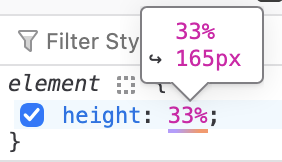
- Nicolas Chevobbe [:nchevobbe] Handle percentage in CSS explainers tooltip (#2041621) and show the tooltip for single non-pixels values (#2074405, #2064400)
-
- (pref: devtools.inspector.css-explainers)
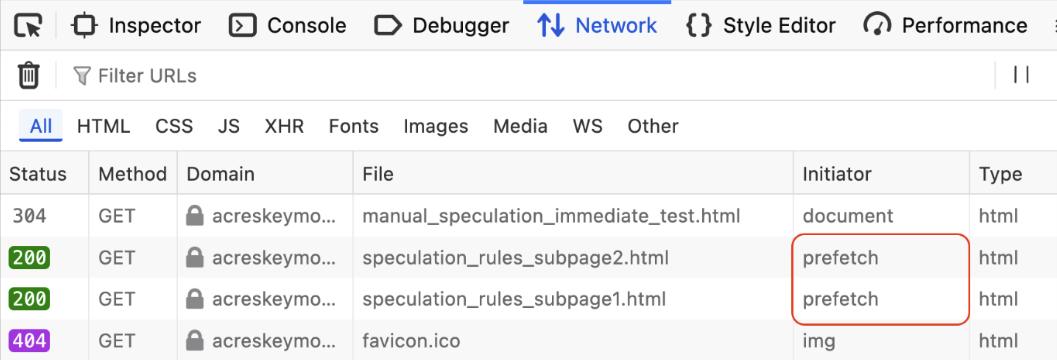
- Hubert Boma Manilla (:bomsy) is working on adding support for speculation rules in DevTools. Prefetched requests can now be identified in the Netmonitor (#2077519) and he plans to add more information about speculations rules in a dedicated tab in the Application panel (#2077995, #2078853)
WebDriver
- Beatriz Rizental improved the Marionette harness to accept multiple -tag arguments similar to other in-tree harnesses.
- Khalid AlHaddad improved the PollPromise to throw an error by default and not only log a warning when it times out.
- Alexandra Borovova added support for the imageSize argument to the browsingContext.captureScreenshot command, which allows clients to specify the maximum size of the resulting screenshot image.
- Alexandra Borovova added support for the destinationFolder argument to the browsingContext.startScreencast command, which allows clients to choose the folder where the recorded video file is saved.
- Alexandra Borovova implemented the support for the prefers-color-scheme parameter in the emulation.setMediaFeaturesOverride command, which lets clients emulate dark or light mode on a website.
- Henrik Skupin improved the handling of recommended preferences for automation to use the default branch, preventing them from leaking into subsequent Firefox sessions.
- Henrik Skupin fixed a bug where accepted server sockets still had Nagle's algorithm enabled, causing up to 40ms delays for back-to-back writes on Linux.
- Henrik Skupin improved geckodriver's shutdown handling by waiting for Firefox's hang monitor to terminate hung processes before force-killing them.
- Henrik Skupin added a temporary workaround to prevent Glean from causing shutdown hangs for short-lived Firefox processes.
- Holger Benl added machine-readable CDDL for all Firefox WebDriver BiDi vendor extensions ("moz:" commands, events, parameters, capabilities…).
- Privileged context support was added to browsingContext.locateNodes and input.performActions by Holger Benl, and to browsingContext.captureScreenshot by Julian Descottes.
- Julian Descottes fixed the network.getData command to handle 304 - Not Modified responses with no timeouts.
Fluent
- Shout out to flod who's started to chip away again at migrating .properties files to Fluent!
- For the first time since we started tracking, there are fewer than 4000 .properties strings in the Firefox source code!
Migration Improvements
- spohl is working on a stack of patches that'll update the migration workflow for macOS 27 to reduce the number of data access permission warnings that users see
New Tab Page
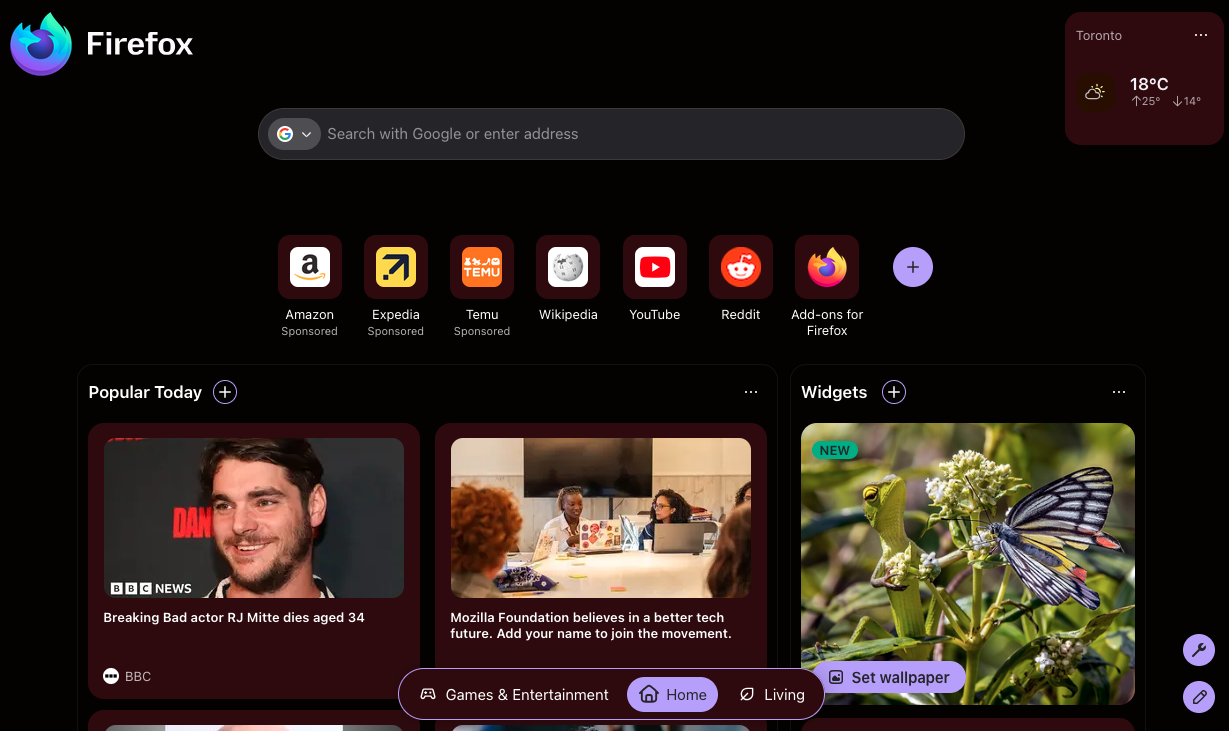
- We're testing a few different layout variations in the wild - one of them is a few different takes on "spaces":
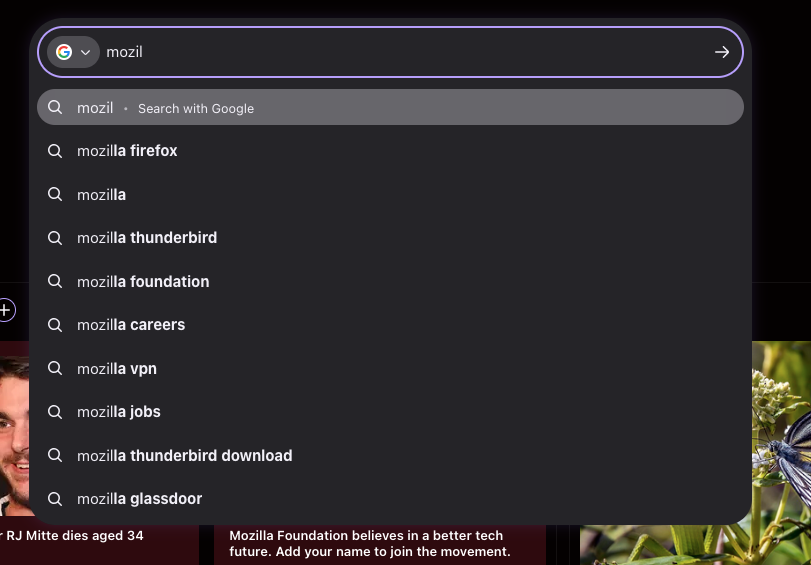
- The MCAB search input is currently being deployed to a small population in the wild to see how it works / is received
- A train-hop is scheduled to be deployed this week which should make widgets available for all users (though for most users, these will be disabled by default - they'll be available to enable in the customize panel).
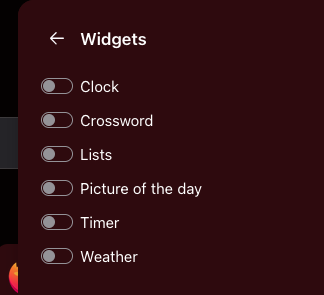
- Reem Hamoui removed the Enzyme/Karma test infrastructure from the New Tab Page, which is a CI/dev tooling change with no direct runtime user impact but should reduce test maintenance and flakiness for future user-facing fixes.
- Jack Brown switched New Tab message visibility checks to an IntersectionObserver so messages below the fold are no longer marked as activeNotifications, preventing offscreen messages from being targeted and avoiding unnecessary JS evaluation when not visible.
- Jack Brown cleared activeNotification targeting when navigating away from about:newtab so message targeting no longer persists after leaving the page, preventing carry‑over interactions and incorrect metrics attribution.
- akulyk [a11y] fixed dialog focus containment on the New Tab Page by enforcing a focus trap and proper Tab/Shift-Tab handling, restoring expected keyboard and screenreader workflows for modal dialogs.
- Scott fixed pocket.click and topsite.click to trigger context menus correctly, restoring right-click/long-press context menus on Pocket tiles and Top Sites so users can access actions like open-in-new-window and remove.
- Maxx Crawford updated per-widget Jest fixtures for Stocks, Privacy and Picture of the Day to omit the widgets.enabled flag in test setups Per-widget Jest fixtures for Stocks, Privacy and Picture of the Day omit widgets.enabled, which aligns test fixtures with runtime enablement behavior and reduces CI flakes and regression risk for those widgets; there is no runtime UI change for end users but widget rendering tests should be more reliable.
- Maxx Crawford removed the Sports widget from the New Tab Page and widget picker, which directly removes sports headline/cards from users' NTP experience (users who had Sports selected will no longer see it) and slightly reduces client-side DOM/paint work and widget surface area for future NTP changes. It also removed about 1MB of image / video assets from the omni.ja / newtab XPI.
- Maxx Crawford added region/locales dynamic control for the Weather widget, allowing users to change the Weather card's region/locale on New Tab so forecasts and localized labels update immediately.
- Herraj Luhano updated the POTD API contract to return the previous day's POTD, enabling the New Tab image module to fetch and display yesterday's Picture of the Day to avoid empty or stale image slots.
- Nina Pypchenko [:nina-py] re-ordered New Tab settings in about:preferences, improving discoverability by placing New Tab controls in a more consistent, prominent location for users managing Start Page options.
- Dre standardized context menu button UI across all widgets, unifying markup, CSS variables and ARIA to make context-menu hit areas and keyboard focus consistent across widget surfaces.
- Dre standardized header typography across all widgets, aligning font sizes, line-heights and tokens so widget headers render consistently on New Tab pages.
- Maxx Crawford updated WallpaperFeatureHighlight to allow for alternate strings to be injected so the New Tab wallpaper feature highlight UI can show injected copy variants (for localization or experiments), which directly changes the text users see in the wallpaper picker/highlight flow and should be monitored for clarification/regression in impressions and CTA click rates.
- David Durfee landed a meta change to enable score-based selection for sponsored tiles in the New Tab experiment, which replaces the previous selection heuristic with a ranking/scoring pipeline so experiment cohorts may see different sponsored tiles on New Tab (affects which ads/content are shown, sponsored impressions/CTR, and A/B metrics for desktop and mobile New Tab surfaces).
- Nina Pypchenko renamed the Stocks widget to "Finance" on the New Tab Page, updating the activity-stream UI/i18n label users see in the widget header.
- Brendan Birdsong adjusted the newtab score-based selection to sum day counts from remote-settings config, which can change which cards/tiles are selected and their ordering for users depending on remote config values.
- Scott Downe removed the discoverystream.optIn-region-weather-config pref from newtab, a config cleanup that does not change runtime New Tab UI or user-visible weather opt-in behavior.
- Irene Ni normalized the layout_name value in New Tab DSCard impression telemetry, ensuring consistent impression records for analytics and A/B experiments without altering the UI seen by users.
- Scott Downe removed the telemetry.structuredIngestion.endpoint pref from newtab, removing a pref-based override for structured-ingestion endpoints (affects developer/testing overrides, not regular user behavior).
- Irene Ni removed unused ImpressionStats dispatches from New Tab DSCard clicks, eliminating redundant telemetry dispatches on DSCard click paths with no UI change.
- Irene Ni normalized Top Sites telemetry keys to their Glean extra names, stabilizing telemetry naming for Top Sites without changing user-visible behavior.
- Dre fixed a slight flash when reusing a previously uploaded wallpaper in the New Tab Page, removing a visible flicker for users who set custom uploaded wallpapers.
- Maxx Crawford added a debug pref/setting to revert region controls, enabling targeted rollbacks/enabled testing for affected-region UI behaviors when the pref is toggled.
- Jared Wein fixed TypeScript errors in newtab/lib blocking inclusion in newtab's tsconfig.json, resolving a build/tooling blocker (developer-only change; no direct user impact).
- Irene Ni made the Spaces arrow-buttons variant background panel occupy the full page height on the New Tab Page, removing a visual gap and ensuring arrow controls stay aligned with page scroll.
- Alexandre Hanot fixed Ads client initialization on Firefox 157 and older so the Ads client now initializes instead of throwing errors on legacy builds, restoring ad content on affected users' New Tab Pages.
- Dre prevented the Clocks widget menu button from overlapping clocks on hover by adjusting z-index and hover layout, restoring visibility and correct hit targets on the New Tab Page.
- Irene Ni enabled a widget in the first content position of New Tab sections, updating New Tab rendering logic so a prioritized widget slot is populated in the first content position and becomes visible by default to users.
- Jared Wein enabled type checking for newtab/lib with exception for failing files, adding incremental static-analysis/CI checks to catch regressions in newtab code without changing UI behavior today.
- Maxx Crawford set default enabled value to false for all existing widgets, changing widget metadata/prefs so existing widgets are opt-in and will no longer render for users unless explicitly enabled.
- David Durfee added differential privacy noise to scores in newtab score-based selection, anonymizing per-user signals which will alter ranking/discovery behavior on the New Tab page while underscoring privacy guarantees.
- Brendan Birdsong moved newtab score storage to PersistentCache, persisting scores across sessions and reducing recompute/lookup latency so personalized selections are more stable and faster to load.
- Jared Wein fixed more newtab/lib TypeScript errors so 11 more files can be type-checked, enabling type-checking across newtab/lib (11 files) and lowering regression risk for New Tab Page behavior.
- Dre used useWidgetTelemetry in the Weather widget to standardize telemetry for the Weather widget (New Tab Page), improving diagnostic signals that help us find and fix user-facing widget issues faster.
- Maxx Crawford turned off all New Tab widgets in automation with one pref, allowing automation to run with widgets disabled to reduce flakiness in tests that interact with New Tab UI.
- Dre updated the Focus Timer widget to use useWidgetTelemetry, so Focus Timer telemetry now respects widget-level prefs and will avoid sending unguarded pings-privacy impact only, no UI change.
- Nina Pypchenko [:nina-py] fixed transparent New Tab dialogs when the train-hop is applied to Firefox 158 and 159, restoring dialog opacity/CSS so newtab overlays are readable again when train-hop is enabled on those releases.
Picture-in-Picture
- kpatenio fixed a bug on Windows and Linux where clicking a previous control overrides the Space play/pause shortcut.
- kpatenio landed a few patches to make keyboard navigation better when the playback speed control is enabled (Bug 2055070, Bug 2074319).
- As of Nightly 159, the PiP player UI has been updated for Nova. Aside from being visually consistent with Nova, scrubbers and settings panels now have better contrast on High Contrast Mode.
Search and Urlbar
Urlbar
- Dao landed a patch to show the "Search tabs" keyboard shortcut in the search mode switcher menu: 2078113
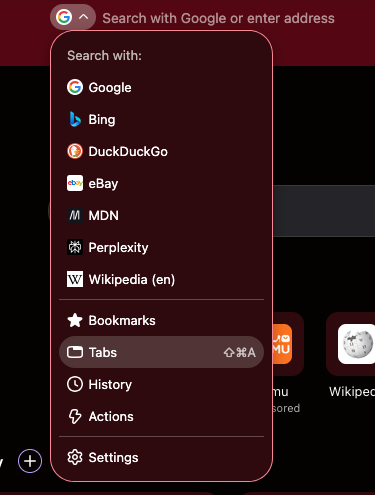
- Logan Rosen changed the Accel+Shift+A shortcut from the Add-ons Manager to Search Tabs: 1666654. Dao followed up by notifying people who used the old shortcut that it moved and revised the wording of that message: 2077823, 2079208
- James added an option to skip the menu when tabbing through the address bar, in both the address bar and the preferences page: 2064708, 2068609
- Dao fixed a bug so that entering an address in search mode now navigates to that URL: 2036347
- Dao fixed two urlbar.bounce telemetry bugs: 2069403, 2076827
- Caleb fixed a bug where the address bar results dropdown covered the calculator tail150 game: 2077358
- Daisuke fixed a bug where search terms in the address bar moved when pressing Enter or when edited: 2074921
- Dao fixed the search engine button being cut off in the Search dropdown with Nova enabled: 2074871
- Daisuke fixed the search switcher's active button color being too strong with low text contrast in Nova: 2068504
- Emilio fixed the Quick Actions background button missing in the Light theme on Ubuntu in Nova: 2076191
- Moritz continued with MCAB (multi-context address bar) follow-on work: 2078231, 2078658, 2078672.
- Moritz also enabled TypeScript type checking for UrlbarView and UrlbarBaseInput: 2077545, 2077543
- Dao significantly improved the address bar docs, including how to add a new search surface end to end, how results and providers work across the process boundary, and how to debug and log the address bar:
Search
- Caleb fixed a bug where the address bar swallowed the first character typed into it if you typed too quickly: 1953361
- Mark continued working on the new search config, search-config-v3: 2063279, 2063264
Places
- Dao fixed a bug where the bookmark creation/editing panel had no keyboard shortcut mnemonic for the Save button: 1877510
Storybook/Reusable Components/Acorn Design System
- Dialogs in about: pages now match Nova designs more closely
- Moz- widgets should now have types found when querying the element with document.querySelector("moz-button") and TS is configured
- A11y fixes for profiles dialog, page nav keyboard handling (no longer steals Ctrl+arrows)
22 Oct 2026 4:56pm GMT
Mozilla Localization (L10N): L10n Report: October Edition 2026
Please note some of the information provided in this report may be subject to change as we are sometimes sharing information about projects that are still in early stages and are not final yet.
Welcome!
New localizers
- Welcome Samin Yasar, a new contributor who took the initiative to restart localization and is bringing a renewed energy to the Bengali community.
Are you a locale leader and want us to include new members in our upcoming reports? Contact us!
New community/locales added
Persian (fa) is now enabled on addons.mozilla.org (AMO). Congratulations and thank you to the Persian localization community for reaching 100% on both AMO projects in Pontoon.
What's new or coming up in Firefox desktop
Felt privacy and protection
In upcoming versions of Firefox, there will be a number of updates focused making the privacy protection features of Firefox felt by the user, in addition to communicating those features in an easy to understand way. Translation has been ongoing and some of these will be released from Firefox 159.
Private Window redesign
A redesigned Private Window experience when opening a new Private Window will be rolled out in an experiment to users starting in Firefox 159, but can be viewed by opening about:config and setting the browser.privateWindowRedesign.enabled flag to true, then opening a new Private Window.
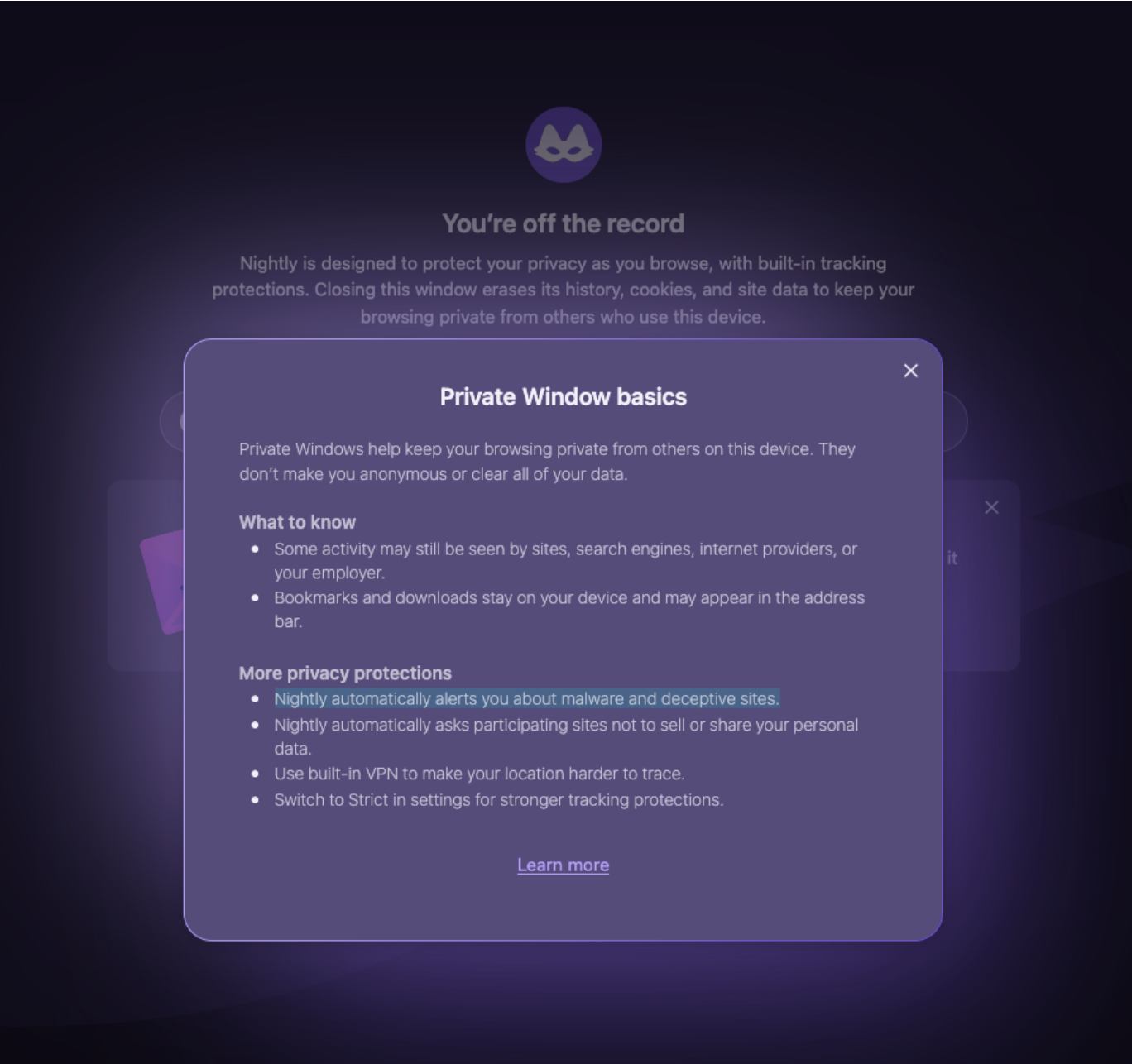
Fire button in Classic Mode
A button that allows users to start fresh in a browsing session, they can clear browsing data in a single click. Strings for this will mostly involve updated wording for existing strings around what data to clear. This is one of many features mentioned in the Firefox roadmap.
Privacy Panel
The privacy panel that shows your protection status for a website (accessible by clicking the shield icon in your address bar) will be getting a complete redesign to more prominently display the number of trackers blocked, important security warnings, and critical site issues. This is still in progress but expect to see strings soon.
Mini Window
An early version of this feature is coming up in Firefox 160 and strings are landing now. The Mini Window gives you the ability to detach a tab or custom section into an always-on-top, scaled-down frame. It expands on the familiar Picture-in-Picture functionality for general web content, making it effortless to keep documentation, messaging apps, or references visible as you work. You can find additional details and a demo of Mini Window on Mozilla Connect.
What's new or coming up in mobile
With our recent switch to releases in 2-week cadence, mobile will see a slew of small but mighty features pop-up in short succession. Some of the recently launched or soon-to-be revealed features include:
Firefox for Android
- Read aloud [AI feature]: Catch up on your reading list on the go by having Firefox read your articles out loud. In reader mode, you will be able to activate the listening feature, select your preferred reading voice and adjust the playback speed, as well as scrub backwards and forwards, so you can skip to the juicy bits quicker.
- Data consent for extensions: We always want to make sure users know exactly what privacy and data collection settings are required when updating their installed extensions. We are making updates to give you even more visibility and control when reviewing which privacy settings are being modified in an update. That way you can decide whether or not to grant permissions and proceed with confidence.
Firefox for iOS
- Quick Answers [AI feature]: use your voice to ask a question straight from your Firefox homepage and get a quick answer backed by sources in just a few seconds! Your voice, your questions and the generated answer stay totally private.
- Transfer Your Data between Browsers: move to Firefox in a snap by importing your bookmarks, history and reading lists from another browser, all in a few simple clicks! You can also export your Firefox data to other browsers.
- Built-in VPN: After making its grand debut in desktop and Android, built-in VPN is coming to Firefox for iOS! Navigate with extra protection on known networks and public wifi. Select from a large selection of locations, or let Firefox choose the fastest one for you. It's always free and signing up with a Mozilla Account gets you extra bandwidth.
What's new or coming up in web projects
Firefox Enterprise is here! It launched on October 13 alongside Firefox 158: Firefox with enterprise controls and a management console that organizations run on their own infrastructure. Read the announcement and explore the website.
The launch starts in France, Germany, Austria and Switzerland, so the website is live in English, French and German. Our translation agency handled these pages, so you won't find them in Pontoon. Thank you to everyone who has helped with firefox.com so far. If you're curious about how localization works for firefox.com and Firefox Enterprise, or have thoughts on it, you're always welcome to get in touch.
Strings for the main firefox.com website continue to land in the firefox.com project in Pontoon, for the locales that have it enabled.
What's new or coming up in SUMO
Semantic search is now live! It was officially launched with Kitsune 1.8.0 on October 6, 2026. This initial rollout is limited to Knowledge Base articles, with broader search improvements still to come. A big thank-you to everyone who participated in the testing phase and helped us improve the experience!
Dark mode is coming to SUMO! You can get an early look by watching the demo in the previous Monthly Community Call or you can also try it yourself on our staging site.
What's new or coming up in Pontoon
Monthly health reports. Following the Community Health Score introduced in the August report, teams can now opt into a monthly health report, delivered as both an email and an in-app notification, with a new toggle in contributor settings. The feature was developed by our intern Jamie (functionzz).
Editor and Machinery. The editor can autofill from composed Machinery matches, the 100% match indicator moved into the editor menu, and leaving an autofilled 100% TM match no longer triggers an unsaved-changes warning.
New contributors. We're happy to welcome another group of contributors who made their first patches to Pontoon in the past few months: baha-bouali (6 patches), scottcampbelldata (4), tahakotil (2), nyomanjyotisa (2), kwy404 (2), annki, Goudarz, Hanabi9248, HarshRajSinghania, and MaxFreedomPollard. Their work spans terminology, search and dropdown behavior, the API, plural handling, theming, insights, right-to-left support, and documentation - thank you all!
Friends of the Lion

Image by Elio Qoshi
Know someone in your l10n community who's been doing a great job and should appear here? Contact us and we'll make sure they get a shout-out!
Useful Links
- #l10n-community channel on Element (chat.mozilla.org)
- Localization category on Discourse
- Mastodon
- L10n blog
Questions? Want to get involved?
If you want to get involved, or have any question about l10n, reach out to:
- Bryan - Project Manager (Firefox, Mozilla Accounts)
- Camila - Project Manager (Firefox for Android, Firefox for iOS)
- Eda - Project Manager (Web projects)
- Francesco (flod) - Project Manager, L10n Team Manager
- Francis - Project Manager (Common Voice, Mozilla Foundation)
- Théo - Project Manager (Mozilla Foundation)
- Kiki - Project Manager (SUMO)
- Eemeli - Developer (Pontoon, Infrastructure)
- Eric - Developer (Pontoon, Infrastructure)
- Matjaž (mathjazz) - Developer (Pontoon)
Did you enjoy reading this report? Let us know how we can improve it.
22 Oct 2026 4:41pm GMT
21 Oct 2026
Planet Mozilla
Firefox Tooling Announcements: Happy BMO Push Day! (20261021.1)
The following changes have been pushed to bugzilla.mozilla.org:
- Bug 2064523 - [meta] tracking bug for BMO dependency upgrades
- Bug 2081849 - Migrate Bug REST resource to native Mojo API: field metadata (fields, legal_values, flag_types)
- Bug 2082654 - 2_test_flags2.t picks a component before the bug page has loaded the new product's components
- Bug 2083156 - Add an alert for excessive lag in the
phab-botfeed processing queue - Bug 2083532 - Webhook bug.modify payload has empty bug.flags when flags are set at bug creation
- Bug 2020752 - [PHABBUGZ] Improve testing of phabricator and bmo integration
- Bug 2079840 - allow @username in the textarea like github
- Bug 2081859 - Migrate Bug REST resource to native Mojo API: comments (comments, add_comment, render_comment, reactions, tags)
- Bug 2078770 - Migrate User REST resource to native Mojo API: MFA (enroll, verify_totp_code)
Discuss these changes in the BMO Matrix Room
1 post - 1 participant
21 Oct 2026 10:23pm GMT
The Mozilla Blog: Still here, still yours: 5 reasons to choose Firefox
The internet used to feel like a community, not a commodity. Browsers were tools for exploration, and you could wander the web without feeling tracked everywhere.
Today, as the web becomes increasingly surveilled and commercialized, Firefox preserves the magic, freedom, and fun of the early internet. Still open source, still independent, still privacy-focused. No billionaire owner, no hidden agenda.
So, whether you're new here, back after a break, or just curious, here are five reasons to choose the browser that puts you first.
Backed by a non-profit, not billionaires
Firefox is backed by the Mozilla Foundation, a non-profit committed to an open internet. Unlike other big tech companies, we're built with privacy as the default. Our open source code is visible, reviewable, and continuously stress-tested by a global community, truly putting power in the hands of the people it's built for.
Private and fast by design
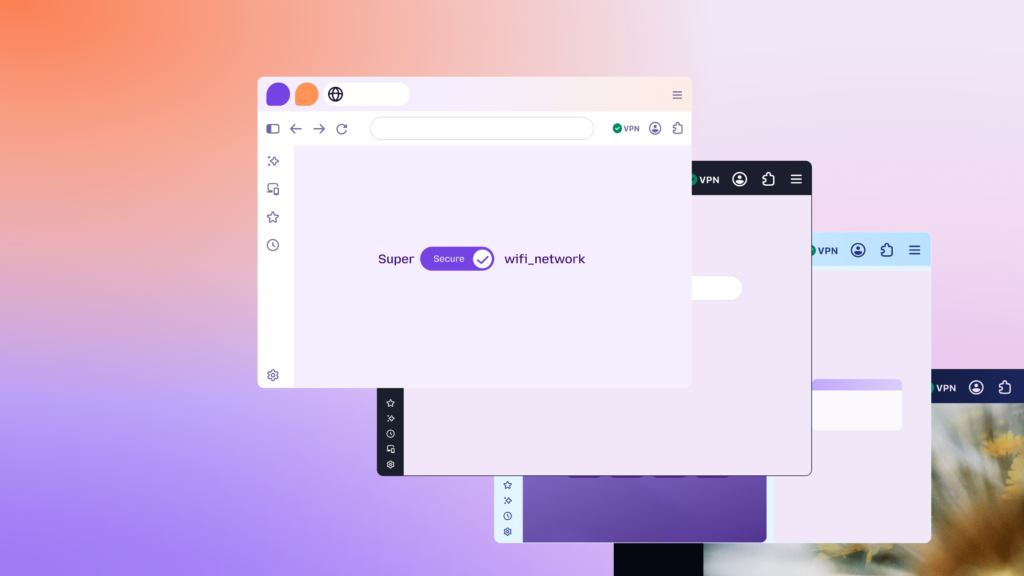
While other browsers allow third-party trackers to profile you, Firefox's Enhanced Tracking Protection (ETP) helps stop cross-site tracking before it starts, letting your browser work faster. Plus, when you sync information like history and bookmarks across devices, it's encrypted locally, meaning only you can access it.
Learn about some of our other privacy-focused features like password manager, built-in VPN, and Relay in our guide to strengthening your online security for free with Firefox.
AI on your terms
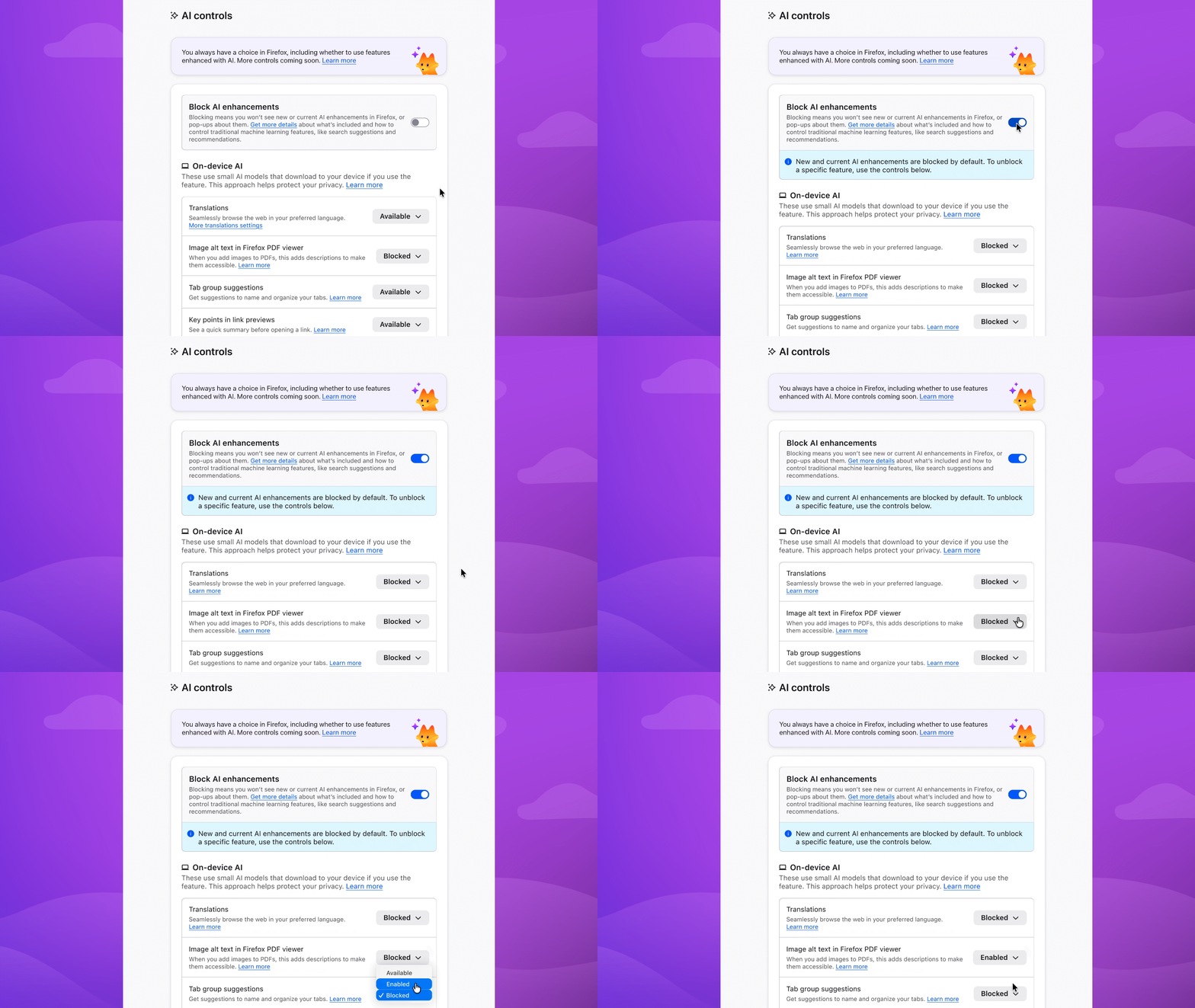
We believe the only person who should decide how you interact with AI features in your browser is you. Firefox offers a clear, easily accessible AI controls section where you can turn off AI features entirely - or decide which ones stay on depending on your workflow and preferences.
For those wanting a little more help getting things done, Smart Window is Firefox's most integrated AI experience. With your permission, its built-in, AI-powered assistant can work directly with your open tabs and browsing history to connect the dots. This means it can compare information, summarize pages, and help plan projects without requiring you to provide context from your past and current browsing activity every time you start a new prompt.
Newer feature additions to Smart Window include the ability to group related tabs together and visual history previews that help you find a page you visited earlier when you can't remember the exact URL or phrase searched. Also, our partnership with Exa enables Smart Window to find current web information to include in responses while also displaying the sources behind these answers, so you can verify what you're seeing without interrupting your workflow.
Smart Window remains in beta as we continue to learn and improve from our community's feedback. Try it yourself here.
Not just Chrome in disguise
Firefox is not built on Chromium, the open source browser project that supports Google Chrome and many other browsers. As a matter of fact, we are one of the last major browsers that isn't.
Instead, Firefox runs on Mozilla's independent Gecko browser engine, which was developed specifically to uphold our strong privacy standards and give people more control over their data and browsing experience.
This independence also impacts how Firefox handles browser add-ons, particularly ad blockers. Unlike Chromium-based browsers that now limit how powerful ad-blocking tools can be, Firefox still allows ad blockers like uBlock Origin to work at full strength. This means people who use Firefox can enjoy stronger, more reliable ad and tracker blocking without compromise, something increasingly difficult on Chromium-based browsers due to imposed limitations.
Plus, we have a really cute Firefox

Firefox is constantly building features and solutions to help you navigate the web on your own terms, and we wanted to make this support visible. Enter Kit, Firefox's companion to the internet.
Kit isn't an AI assistant or chatbot, just a friendly face that you might see during moments that are meant to feel friendly and supportive, like when you're just getting set up, exploring a new feature, or celebrating a win such as successfully adjusting a setting.
Rooted in values, built for you
While the internet is ever-changing, Firefox remains rooted in the values that defined its beginning. Our browser was created on the principles of privacy, independence, and choice,and we continue to uphold them as we innovate and evolve.
In a web landscape dominated by profit, surveillance, and sameness, our browser preserves the open and human spirit of the early internet. New, returning, or loyal for years, there's always a place for you here.
Download Firefox and make the web yours again.
The post Still here, still yours: 5 reasons to choose Firefox appeared first on The Mozilla Blog.
21 Oct 2026 4:00pm GMT
Firefox Tooling Announcements: PerfCompare deployed (Oct 21st, 2026)
The latest version of PerfCompare is now live!
Check out the change-log below to see the updates:
[kala-moz]:
-
Bug 2058236: Show a notice when column filters hide result rows
-
Bug: 2075044 Significance filter and sort selections don't persist
[gopar]:
-
Bug-2039589 - Add caching to ttest/mwu views
-
Bug 1846013 Add ability to display multiple framework results
-
Bug-1941337 - Add new formatter for delta values
[moijes]
Thank you for the contributions!
Bugs or feature requests can be filed on Bugzilla. The team can also be found on the #perfcompare channel on Matrix. Come and chat!
1 post - 1 participant
21 Oct 2026 3:20pm GMT
This Week In Rust: This Week in Rust 674
Hello and welcome to another issue of This Week in Rust! Rust is a programming language empowering everyone to build reliable and efficient software. This is a weekly summary of its progress and community. Want something mentioned? Tag us at @thisweekinrust.bsky.social on Bluesky or @ThisWeekinRust on mastodon.social, or send us a pull request. Want to get involved? We love contributions.
This Week in Rust is openly developed on GitHub and archives can be viewed at this-week-in-rust.org. If you find any errors in this week's issue, please submit a PR.
Want TWIR in your inbox? Subscribe here.
Updates from Rust Community
Official
Newsletters
Project/Tooling Updates
Observations/Thoughts
- Cloudflare is rewriting everything in Rust
- What agents mean for Rust (and vice versa)
- Black-Box HashDoS: Attacking Hash Tables Without Knowing the Hash Function
- 2026 is an exciting year for the Rust compiler (and me)
- What the crates.io download count really measures: 90 days of daily data from 69 crates
- Safe self-referential data structures in kernel Rust
- Cross-crate forward declarations in Rust
- Why tellus message handlers are synchronous
- Upstreaming Tyr: Rust, DRM, and the Linux Kernel
Rust Walkthroughs
- I forced a speech model onto the GPU for months. The CPU was faster.
- Superoptimizing an FPU emulator
- Draw and Animate Loading Spinner with GPUI
- [series] Encoding TCP in Rust's Type System, Part 1: A Sequence Number Is Not a
u32 - [series] Running 10 million Codex CLIs on one server - LFI processes
Research
- An Incremental Approach to JIT Construction
- [video] [Scheme'26] An Incremental Approach to JIT Construction
Miscellaneous
Crate of the Week
This week's crate is eilmeldung, a TUI RSS reader.
llogiq is pretty pleased with his choice, despite a lamentable lack of suggestions.
Please submit your suggestions and votes for next week!
Calls for Testing
An important step for RFC implementation is for people to experiment with the implementation and give feedback, especially before stabilization.
If you are a feature implementer and would like your RFC to appear in this list, add a call-for-testing label to your RFC along with a comment providing testing instructions and/or guidance on which aspect(s) of the feature need testing.
No calls for testing were issued this week by Rust, Cargo, Rustup or Rust language RFCs.
Let us know if you would like your feature to be tracked as a part of this list.
Call for Participation; projects and speakers
CFP - Projects
Always wanted to contribute to open-source projects but did not know where to start? Every week we highlight some tasks from the Rust community for you to pick and get started!
Some of these tasks may also have mentors available, visit the task page for more information.
ScreenCue
sysknife
- sysknife - README says the CLI's approval gate is sysknife approve; the CLI approves in-process after its own prompt
- sysknife - --dry-run exits 0 for a plan that breaks --max-risk or that this distro cannot run
- sysknife - Re-running sysknife-setup while the daemon runs fails with ETXTBSY and can leave mismatched binaries
Manguebyte
- Manguebyte - Put ParamSmoother under the allocation guard
- Manguebyte - Treat a NaN delay as the shortest delay in DelayLine::read and Delay::set_time
- Manguebyte - Check security advisories in the cargo deny job
- Manguebyte - Let a plugin report its tail to hosts
- Manguebyte - Add audio widgets, starting with an on-screen keyboard
krate
- krate - Fix two warnings on the wasm32 and Windows targets (easy)
- krate - Linux: follow the person's dark mode and text size (medium)
- krate - krate pack: add a --keep-debug flag (medium)
If you are a Rust project owner and are looking for contributors, please submit tasks here or through a PR to TWiR or by reaching out on Bluesky or Mastodon!
CFP - Events
Are you a new or experienced speaker looking for a place to share something cool? This section highlights events that are being planned and are accepting submissions to join their event as a speaker.
If you are an event organizer hoping to expand the reach of your event, please submit a link to the website through a PR to TWiR or by reaching out on Bluesky or Mastodon!
Updates from the Rust Project
601 pull requests were merged in the last week
Compiler
- improve diagnostic for literals in lint attributes
- improve diagnostics for non-well-formed associated items
- fix
diagnostic::on_unknownformat placeholder for paths in expressions and type paths - move
fully_performearly return earlier - overhaul span compression
- perf: drop error in
unwrap_failedinstead ofunwrap - port lint attributes
- provide context span pointing at trait/item when talking about assoc items
- restore the old behavior for
derive(Default)on fieldless types - skip move checks when the size limit is zero
- stabilize
-Zembed-metadata - support function args const generics
Library
- add
codeview_annotationintrinsic - add
core::process::resumable_breakpoint - make
std::fs::{File, ReadDir, DirEntry}alwaysneeds_dropeven when unsupported - make tuple
PartialOrdchaining easier on mir-opt - windows: stabilise
inherit_handles
Cargo
build-std: Add build.build-std.when and crates config keysprerelease: support[patch]with-Zprereleaseconfig: Apply dotted tuple support for rustflagsconfig: Don't load registry config from credentials.tomlfingerprint: choose a stable path when source mtimes tieutil-schemas: compile out the file-path hint where url can't build it- shell completion show all the packages having the feature
- check crate type when pruning
-Lpaths
Rustfmt
- config: fix lookup of global config files
- don't remove empty generic args when formatting in a macro context
- enforce comment width in item lists
- fix
cfg_select!parser recovery handling and parser session error count leak - fix statement comment wrapping
- prevent rustfmt from removing expression attrs when removing nested parens
- prevent rustfmt from removing necessary blocks in
cfg_select!arms
Rustdoc
- add disambiguators for identically named method in sidebar
- improvements for
rustc_must_implement_one_of
Clippy
- allow
allow_attributesfrom inside macros - bail all doc lints when attributes come from external macro expansion
- clear collection reassignment
- extend
from_str_radix_10to NonZero types - fix
try_from_instead_of_from_strlint suggestion causes error whenTryFrom::try_fromparameter is not namedvalue - fix
wildcard_importsinfinite loop on macro generated glob imports - fix trailing semicolon with
nonstandard_macro_braces - new lint:
bufreader_stdin useless_attribute: no longer lintclippy::allow_attributes
Rust-Analyzer
viewMirpanicking in code containing field projections- bail out of
struct_tail_erasing_lifetimeson infinite structs - build non-ambiguous monikers in crates with multiple targets
- emit E0029 for range patterns with inferred invalid types
- escape keyword module name completions
- improve attribute completions without snippet
- ops: resolve
ref-version-mismatch,stale-action-refs, andunpinned-uses
Rust Compiler Performance Triage
A week dominated by changes of small magnitude. However, a number of improvements landed that results in an overall average improvement of 1.4%, which is a quite nice to see.
Triage done by @simulacrum. Revision range: 7211ea59..bd4c6cc4
6 Regressions, 9 Improvements, 8 Mixed; 0 of them in rollups 43 artifact comparisons made in total
Approved RFCs
Changes to Rust follow the Rust RFC (request for comments) process. These are the RFCs that were approved for implementation this week:
Final Comment Period
Every week, the team announces the 'final comment period' for RFCs and key PRs which are reaching a decision. Express your opinions now.
Tracking Issues & PRs
- core: Add
assert_matchesanddebug_assert_matchesto the next prelude - Lower #[no_mangle] to #[symbol_name]/#[link_name]
- stabilize String::into_chars
- stabilize {Rc, Arc}::is_unique
- vec: stabilise allocators for into_iter
- Don't require
unsafefor struct and array patterns against union fields - Add a future incompat warning for #[no_link]
- raise ambiguity error on attribute macro that could be tool attribute
- stabilize
-Znext-solver=globally - Stabilize
--remap-path-scopein rustdoc and thedocumentationscope
No Items entered Final Comment Period this week for Rust RFCs, Cargo, Language Team, Language Reference, Leadership Council or Unsafe Code Guidelines. Let us know if you would like your PRs, Tracking Issues or RFCs to be tracked as a part of this list.
New and Updated RFCs
- Deprecate
std::env::{vars, args} - RFC: document a strict
Futurecontract that forbids snoozing - RFC: extern "Rust_manyregs" ABI
- RFC: add
poll_progresstoAsyncIterator
Upcoming Events
Rusty Events between 2026-10-21 - 2026-11-18 🦀
Virtual
- 2026-10-21 | Hybrid (Vancouver, CA) | Vancouver Rust
- 2026-10-21 | Virtual (Cardiff, UK) | Rust and C++ Cardiff
- 2026-10-22 | Virtual | Rust 🦀 Maven
- 2026-10-22 | Virtual (Berlin, DE) | Rust Berlin
- 2026-10-26 | Virtual | Rust 🦀 Maven
- 2026-10-27 | Virtual (Dallas, TX, US) | Dallas Rust User Meetup
- 2026-10-27 | Virtual (London, UK) | Women in Rust
- 2026-10-29 | Virtual | Rust 🦀 Maven
- 2026-11-01 | Virtual (Dallas, TX, US) | Dallas Rust User Meetup
- 2026-11-03 | Virtual | Rust 🦀 Maven
- 2026-11-03 | Virtual (London, UK) | Women in Rust
- 2026-11-04 | Virtual (Indianapolis, IN, US) | Indy Rust
- 2026-11-05 | Virtual (Berlin, DE) | Rust Berlin
- 2026-11-10 | Virtual (Dallas, TX, US) | Dallas Rust User Meetup
- 2026-11-12 | Virtual (Nürnberg, DE) | Rust Nuremberg
- 2026-11-15 | Virtual | Rust 🦀 Maven
- 2026-11-15 | Virtual (Dallas, TX, US) | Dallas Rust User Meetup
- 2026-11-17 | Virtual | Rust 🦀 Maven
- 2026-11-17 | Virtual (London, UK) | Women in Rust
- 2026-11-17 | Virtual (Washington, DC, US) | Rust DC
- 2026-11-18 | Hybrid (Vancouver, CA) | Vancouver Rust
Asia
- 2026-11-03 | Tel Aviv-Yafo, IL | Rust 🦀 TLV
- 2026-11-14 | Bengaluru, IN | Rust Bangalore
Europe
- 2026-10-22 | Karlsruhe, DE | Rust Hack & Learn Karlsruhe
- 2026-10-22 | Toulouse, FR | Rust Toulouse
- 2026-10-27 | Aarhus, DK | Rust Aarhus
- 2026-10-27 | Paris, FR | Rust Paris
- 2026-10-28 | Copenhagen, DK | Copenhagen Rust Community
- 2026-10-31 | Stockholm, SE | Stockholm Rust
- 2026-11-01 - 2026-11-03 | Italy, IN | RustLab
- 2026-11-04 | Dublin, IE | Rust Dublin
- 2026-11-05 | Milano, IT | Rust Language Milan
- 2026-11-17 | Leipzig, DE | Rust - Modern Systems Programming in Leipzig
North America
- 2026-10-21 | Hybrid (Vancouver, CA) | Vancouver Rust
- 2026-10-21 | San Francisco, CA, US | Bay Area Rust
- 2026-10-22 | New York, NY, US | Rust NYC
- 2026-10-24 | Boston, MA, US | Boston Rust Meetup
- 2026-10-28 | Austin, TX, US | Rust ATX
- 2026-10-31 | Boston, MA, US | Boston Rust Meetup
- 2026-11-05 | Montréal, CA | Rust Montréal
- 2026-11-05 | San Francisco, CA | Rust LA: NVIDIA!
- 2026-11-05 | Saint Louis, MO, US | STL Rust
- 2026-11-12 | San Diego, CA, US | San Diego Rust
- 2026-11-14 | Boston, MA, US | Boston Rust Meetup
- 2026-11-17 | Los Angeles, CA, US | Rust Los Angeles
- 2026-11-17 | San Francisco, CA, US | San Francisco Rust Study Group
- 2026-11-18 | Hybrid (Vancouver, CA) | Vancouver Rust
South America
- 2026-11-07 | Planalto Paulista, BR | Rust São Paulo Meetup
If you are running a Rust event please add it to the calendar to get it mentioned here. Please remember to add a link to the event too. Email the Rust Community Team for access.
Jobs
Please see the latest Who's Hiring thread on r/rust
Quote of the Week
To me it seems the same things that make Rust a desirable target for LLM generated code are the same things that make it desirable for me as a human writing code, that being the fantastic compiler feedback and the first class tooling.
- Christian Haynes on rust-users
Thanks to Moy2010 for the suggestion!
Please submit quotes and vote for next week!
This Week in Rust is edited by:
- nellshamrell
- llogiq
- ericseppanen
- extrawurst
- U007D
- mariannegoldin
- bdillo
- opeolluwa
- bnchi
- KannanPalani57
- tzilist
Email list hosting is sponsored by The Rust Foundation
21 Oct 2026 4:00am GMT
20 Oct 2026
Planet Mozilla
Mozilla Security Blog: Protecting Firefox users following the compromise of eMudhra intermediate certificates
On Saturday, October 17, at 20:06 UTC, Mozilla received a report that private keys associated with eight eMudhra intermediate certificates had been compromised. These keys could allow attackers to issue fraudulent HTTPS certificates for websites they do not control. An attacker who could intercept a user's connection could use those certificates to impersonate websites and potentially read or modify traffic.
Mozilla engineers responded immediately, blocking the affected certificates in Firefox using OneCRL, Mozilla's centralized list of revoked certificates. OneCRL delivers this protection without requiring users to update or restart Firefox.
By 22:59 UTC that same day, in less than 3 hours after we received the report, the updated OneCRL distribution was complete for all Firefox users with standard configurations.
Today, we are also releasing Firefox 158.0.1 for Desktop and Android, along with Firefox ESR 115.43.1 and Firefox ESR 153.5.1. These releases will distribute this protection for a minority of users whose custom settings may have prevented them from receiving the OneCRL update.
We are also updating the trusted certificate list in NSS (NSS 3.131.1) to remove the root certificate that signed the affected intermediates. Firefox is already protected through OneCRL, but this additional update helps protect other applications that use Mozilla's trust store or versions derived from it and do not receive OneCRL updates.
Mozilla believes everyone has a fundamental right to security and privacy online. We remain committed to defending those rights and acting quickly to protect users.
Transparency is essential to trust. We will share more information as soon as circumstances allow.
Update added October 21: On Wednesday, October 21, at 08:29 UTC, we released an additional update for Firefox for Android (158.0.2) to fix an issue where some clients were not applying changes to the bundled OneCRL blocklist immediately after startup.
The post Protecting Firefox users following the compromise of eMudhra intermediate certificates appeared first on Mozilla Security Blog.
20 Oct 2026 12:54pm GMT
The Mozilla Blog: Why is the CMA asking us to choose the furniture before the house? The UK’s search choice screens need browser choice screens alongside them
Mobile browsers are a key gateway to the internet for 56 million people in the UK. Smartphone users spend around half an hour a day in these apps, and opening a browser is the most common way they look up information online.
Yet most people are using a smartphone browser that was preinstalled and set as the default for them, without ever being asked which browser they would actually prefer.
Mozilla believes people deserve an active choice in the tools they depend on every day, which is why the latest proposals from the UK Competition and Markets Authority (CMA) matter. We welcome the CMA's plans to give people a choice of search service and are asking it to consult on browser choice now, so both screens can launch together.
On September 23rd, the CMA published updated plans that would require Google to show people in the UK a choice of search service on new Android devices, covering the default search app and home-screen search widget as well as Chrome. Search choice screens would also appear in Chrome on other platforms, including through a major update for existing users. Some AI assistants would also be eligible to appear alongside search engines.
The proposals are well designed, but solve only half the problem
The CMA's mobile browser investigation found that preinstallation, prominent placement and default settings restrict browser competition. Mozilla's innovative 2023 experiment showed that properly designed browser choice screens can help people choose a browser they expect to keep using, and can be an effective tool for giving people agency over their online life. It also showed that an overwhelming majority of people (98%!) want to see them.
The EU Digital Markets Act has since demonstrated their impact in practice. We welcome the CMA's work on search choice, but people in the UK deserve browser choice too. Asking people to pick a search service inside a browser that most of them never actively chose in the first place leaves some of the biggest issues identified in the CMA's own mobile browser investigation unaddressed.
The CMA commissioned user research on search choice screens to refine and improve the proposals it first consulted on in January. Providers' positions on the choice screen would be fully randomised. Users would have to scroll to the bottom before confirming, and could "test drive" a search provider for at least a week.
The CMA has also recognized that search is changing. Its research found that many people were already using AI assistants to search alongside traditional search services. Under the revised, more technology-neutral eligibility criteria, an AI assistant could also qualify to appear on the search choice screen if it meets the requirements, including being able to search the web and attribute its sources. But browser choice should not be left behind.
Why the two choices belong together
- Less confusion. The CMA's new research found that participants often confused browsers with search services and were unsure what their search choice would change. Mozilla's research has revealed similar confusion. These findings support designing and testing the two screens together, with clear explanations of each decision.
- Less duplication. The CMA's work on search choice can also inform browser choice. Developing the two together would allow the design, order and timing to be tested as one journey, helping to avoid separate rounds of changes and interruptions for users.
- Order matters. Nobody chooses the furniture before the house. Browsers have their own search defaults, which is why we recommend showing the browser choice screen first, followed by the search screen, with wording that makes clear these are two separate decisions.
The EU and Japan already show both screens
The EU's Digital Markets Act introduced browser choice screens on iOS for the first time and brought browser and search choice together during Android set-up.
Browser first, then search, so the relationship between the two makes sense. In Japan, search and browser choice screens are presented on both Android and iOS.
And people are making use of the browser screen to select alternatives. In May, we reported Firefox is selected through a DMA choice screen once every ten seconds, with retention five times higher than for organic downloads. Other independent browsers have also reported substantial growth.
Choice matters more as AI moves into the browser
The CMA's proposals recognize that AI is changing how people search. AI is also changing what browsers offer, adding to the ways they compete on features, privacy and user control. Firefox already lets people on desktop pick which AI assistant sits in the sidebar, and our Smart Window beta extends that choice to the model behind the browser's own assistant. There are meaningful differences between browsers. AI is the latest example of why giving people an active choice matters.
When people aren't offered an active browser choice, they may be choosing search and AI services within a browser someone else picked. One decision taken at the factory can end up shaping the ones that follow. A search choice screen gives people a say over their search provider; offering browser choice alongside it would give them a say over that first decision too.
Our ask of the CMA
We're asking the CMA to consult now on browser choice screens for Apple's and Google's mobile platforms, so they can launch alongside the search screens. Apple and Google already offer browser choice screens in the EU and Japan. The CMA can draw on that experience and its own research to give people in the UK an active choice of both browser and search service.
Mozilla's response to the consultation is available here.
The post Why is the CMA asking us to choose the furniture before the house? The UK's search choice screens need browser choice screens alongside them appeared first on The Mozilla Blog.
20 Oct 2026 7:00am GMT
The Rust Programming Language Blog: Announcing rustup 1.29.2
The rustup team is happy to announce the release of rustup version 1.29.2.
Rustup is the recommended tool to install Rust, a programming language that empowers everyone to build reliable and efficient software.
What's new in rustup 1.29.2
This is a small release which only updates the rustls-webpki and webpki-root-certs dependencies to address the problematic eMudhra intermediate certificates issue described in CVE-2026-111943.
See also RUSTSEC-2026-0382.
Further details are available in the changelog!
How to update
If you have a previous version of rustup installed, getting the new one is as easy as stopping any programs which may be using rustup (e.g. closing your IDE) and running:
$ rustup self updateRustup will also automatically update itself at the end of a normal toolchain update:
$ rustup updateIf you don't have it already, you can get rustup from the appropriate page on our website.
Rustup's documentation is also available in the rustup book.
Caveats
Rustup releases can come with problems not caused by rustup itself but just due to having a new release.
In particular, anti-malware scanners might block rustup or stop it from creating or copying files, especially when installing rust-docs which contains many small files.
Issues like this should be automatically resolved in a few weeks when the anti-malware scanners are updated to be aware of the new rustup release.
Thanks
Thanks again to all the contributors who made this rustup release possible!
20 Oct 2026 12:00am GMT