21 Oct 2026
 Planet Grep
Mattias Geniar: The 7 reasons Apple rejected my app, and what I changed

Snapkin went live in the App Store on September 24th. It got there on the sixth submission. The first five came back rejected, with seven different reasons between them. 😅
21 Oct 2026 8:59pm GMT
Mattias Geniar: Snapkin has an engineering blog now
Building Snapkin means running a lot of experiments. Which AI model reads a plate best, what a prompt change does to the accuracy, how long you wait for an answer, what each call costs, …
21 Oct 2026 8:59pm GMT
Mattias Geniar: PHP's new memory_hard_limit_percent setting
The PHP security releases of 21 October add a new setting: memory_hard_limit_percent. It changes what memory_limit means. memory_limit is now a soft limit. A second, higher limit sits above it. A process that reaches that one is ended on the spot, with exit code 137. No shutdown functions, no error page, no line in your PHP error log.
21 Oct 2026 8:59pm GMT
Mattias Geniar: PHP CVE-2026-109618 and CVE-2026-109619: how to apply the patches
Status at 13:45 UTC: PHP released the fix. The fixed versions are 8.5.12, 8.4.27, 8.3.36 and 8.2.35. They came out at about 13:35 UTC, ahead of the 14:00 UTC schedule (PHP's advisory ). Packages are arriving now. See package status for which ones you can install. This post updates as more packages arrive.
21 Oct 2026 8:59pm GMT
Mattias Geniar: PHP CVE-2026-109618 and CVE-2026-109619: early mitigation steps
Later this afternoon, PHP is going to announce the patches for two highly critical vulnerabilities found in the PHP core. Both seem exploitable without authentication on any remote website that has sessions or file uploads enabled, which both are enabled in the default php.ini config.
21 Oct 2026 8:59pm GMT
Mattias Geniar: From laravel-echo-server to laravel-websockets to Laravel Reverb
This post replaces "Transitioning from Laravel Echo Server to Laravel WebSockets", which I wrote for the Oh Dear blog on 4 December 2018. The full 2018 story is below. I added what happened to both packages since, what Oh Dear runs today, and how I'd set this up in 2026 with Laravel Reverb.
21 Oct 2026 8:59pm GMT
Lionel Dricot: The AI Pascal’s Wager

The AI Pascal's Wager
Should you accept contributions generated by LLMs in your Open Source project?
Let's put aside for a moment all the ethical/ecological/societal considerations about the use of generated code (also known as "slop" if you don't like it and "vibecode" if you do) in open source projects and consider it from a simple, practical, pragmatic point of view.
There are basically three potential positions:
1. Mostly accepting LLMs as neutral tools that contributors could use (with safeguards or not, with policy of human reviewing or not).
2. Finding a compromise or choosing not to do anything, issuing some "not yes, not no" guidelines. This is now known as the "Debian AI policy".
3. Strongly rejecting LLMs (with potential exceptions that have major safeguards).
The middle ground (position 2) may seem like the most rational position to take. It is also the default. Let's wait and not decide too quickly!
But what we can learn from Debian is that nobody is really happy with it. If we think about it from a longer-term perspective, we can infer that the middle-ground position is unsustainable. LLM generated contributions will eventually slip in despite some guardrails such as "human review is mandatory". The longer a project stays in the "middle ground", the more ineluctable the slop infection becomes.
Which is to say: not choosing or trying to choose a middle ground is basically full support of generated code, but slower. It is effectively choosing position 1 (pro-AI) without being explicit about it. It is either naive or hypocritical.
Instead of letting the world choose for you, I believe that each open source project is now facing a strong choice that has to be made urgently. Accept AI-generated contributions or not.
This is not easy.
Both choices will alienate some part of the community and some key contributors. That's sad, but a project cannot please everyone.
Now, contributors may argue whether pro-vibecode or anti-slop is better from a philosophical, ethical or pragmatic point of view. Nobody can decide what is best for a project but its key community members.
Let's try to think from a generic strategical point of view. What will be the effects of both positions on the project?
Adopting AI
PROS:
- More contributions and less time spent developing annoying stuff. While every study on the subject tends to conclude that using LLMs is actually slower than writing code yourself, let's admit that advantage.
CONS:
- Alienate a part of the community that rejects vibecoded software. In some FLOSS circles, that may include very influential users.
- Developing your project become increasingly dependent of on expensive and completely proprietary software over which you have no control.
So, in the short term, adopting AI mostly alienates some community members and abandons your independence in order to improve some (perceived) productivity.
Rejecting AI
PROS:
- Strong support from the "ethical" part of the community (see the growing number of anti-AI software lists)
- Nothing changes.
CONS:
- Alienate some contributors who really want to use AI.
When you think about it, contributors who are completely turned away by the fact that they can't use LLMs are probably contributors you don't want in your project, even if you have a Debian-like "moderate use of AI" position. People who don't want to contribute without LLMs are probably not able to review and understand the code by themselves (or they will lose that ability soon enough). To illustrate this, see the number of Pull Requests on Github were the author admits "not having the knowledge to test their own code".
So refusing contributions from those people is probably more of an advantage than a disadvantage.
More importantly, rejecting AI will not alienate any users. Nobody in the world is saying "I'm refusing to use this software because it was made by humans".
The longer-term perspective
One of the main problems with using generated code is that we still don't know what impact it could have in the long term. What will the codebase look like when each contribution is less and less understood by humans? What if AI assistants become suddenly too expensive to use and nobody understand the architecture anymore? What if huge portions of your code are, in fact, copy-pasted from another project using a different incompatible license?
Cory Doctorow compares slop to asbestos: it looks nice, shiny and it is easy to put it everywhere. But if you ever need to regain control or remove the slop, it will take years of work, at best.
Your own version of Pascal's wager
While mass marketing is trying to instil a Fear of Missing Out hysteria, the most rational and pragmatic approach is to strongly reject all AI-generated contributions to your projects. For now.
Someday, we might realise that LLMs are doing good in the world, that they are evolving toward ethical, reliable, sustainable solutions, and that people who use them are happier (try to read that sentence again without rolling your eyes). If that really happens, you could always change your AI policy. It will cost you nothing.
But if you let the slop in now, you may regret it forever… You may be forced to abandon your project.
On the other hand, if you refuse AI-generated contributions to your project right now, the worst very hypothetical regret you could ever have is "I should probably have done it sooner".
The conclusion is simple: If you are AI-agnostic, the pragmatic course of action is to strongly refuse any AI-generated contribution to your project.
About the author
I'm Ploum, a writer and an engineer. I like to explore how technology impacts society. You can subscribe by email or by rss. I value privacy and never share your adress.
I write science-fiction novels in French. For Bikepunk, my new post-apocalyptic-cyclist book, my publisher is looking for contacts in other countries to distribute it in languages other than French. If you can help, contact me!
21 Oct 2026 8:59pm GMT
Frederic Descamps: Vector Search in MySQL vs MariaDB: Look Beyond QPS
 A few days ago, I came across an interesting post by Hussain Patel on LinkedIn about HNSW index implementation differences in every vector databases. I was very surprised not to see MariaDB in the list. One day later, AskDBA (Alkin Tezuysal) published a benchmark article comparing vector search using MyVector on MySQL with the native […]
21 Oct 2026 8:59pm GMT
Frank Goossens: Querido Duolingo, please make those annoying puzzle pieces optional

Querido Duolingo, please make those annoying puzzle pieces optional! That's it, that's the post.
21 Oct 2026 8:59pm GMT
Frank Goossens: Nazomerfietsen langs het Albertkanaal
Frank Goossens: Gelezen; “Duivels en Heiligen” van Jean-Baptiste Andrea
Een oude pianist vertelt over zijn jeugd in het weeshuis en waarom hij alleen op openbare piano's speelt. Het lijkt soms een jeugd avonturenroman, maar dan wel een heel donkere. Andrea schrijft zoals ik veronderstel dat Joe piano speelde; zonder kapsones en virtuoos (zoals hij dat ook deed in het sublieme "Waak over haar"). 4/5…
21 Oct 2026 8:59pm GMT
FOSDEM organizers: FOSDEM 2027 Call for Main Track talks

Proposals for main track talks for FOSDEM 2027 can now be submitted!
FOSDEM offers open source and free software developers a place to meet, share ideas and collaborate. Renowned for being highly developer-oriented, the event brings together some 8000+ geeks from all over the world.
The twenty-seventh edition will take place on Saturday 30th and Sunday 31st of January 2027 at the usual location, ULB Campus Solbosch in Brussels.
Main track presentations cover topics of interest to a significant part of our audience that do not fit into any of the usual developer rooms, perhaps because of the topic or the large size of the anticipated audience.
We're looking for both highly technical talks, and also less technical insights into areas of interest to open source communities.
This year presentations are either 25 or 50 minutes long including audience questions.
Submission for talks in devrooms will open after devrooms are selected and announced.
The conference language is English. All content must relate to Free and Open Source Software. By participating in the event you agree to the publication of recordings, slides and other content provided under the same licence as all FOSDEM content (CC-BY). You also accept the FOSDEM Code of Conduct.
If you have questions or need help crafting a good submission, contact us at program@fosdem.org.
The deadline for submissions is 16th November.
Submit your talk here.
21 Oct 2026 8:59pm GMT
Dries Buytaert: State of Drupal presentation (September 2026)

Drupal is now light-years ahead of its reputation. Closing that gap is our #1 challenge, and it was the main message of my DrupalCon Rotterdam keynote.
Just over two years ago, I launched Drupal Starshot. I did it because I wasn't sure we could still innovate like we used to. It turns out we can.
Starshot became Drupal CMS, which brings together Site Templates, Recipes, Drupal AI, Drupal Canvas and more to make building websites easier.
Alongside that work, Drupal Core has become a faster and better framework for developers. A stronger Drupal Core helps us build a better Drupal CMS, while building Drupal CMS has driven further improvements in Drupal Core.
Unfortunately, many people outside the Drupal community haven't seen what Drupal can do today. In Rotterdam, I showed how far we have come and where we're going next, and we launched an advocacy program to help more people see how great Drupal has become.
If you missed the keynote, you can watch the video below or download my slides (86 MB).
More ways to reach more people
The first part of my keynote showed improvements for multilingual sites, JavaScript front-ends, headless Canvas, and Drupal AI.
Drupal has long had strong multilingual capabilities, but Drupal Canvas, our powerful new page builder, didn't yet support multilingual sites. Not only did we add multilingual support to Canvas, but we made all multilingual sites easier to set up.
React has one of the world's largest developer communities. Drupal Canvas code components are written in React, and we designed the developer experience around the tools, patterns, and workflows front-end JavaScript developers already know. They can use their preferred development tools, including modern AI-assisted workflows, without having to learn Drupal-specific concepts or conventions. We've continued to make that experience better, lowering the barrier for a much larger community of developers to build with Drupal.
At DrupalCon, we extended that same model with Drupal Canvas Headless. Developers can now use Drupal to manage content while building the front-end separately with frameworks like Next.js, Astro, TanStack, Angular, or Nuxt. Editors still get the visual experience of Drupal Canvas: they can build pages in Drupal and preview exactly how those pages will appear on the front-end.
This changes an important trade-off. Teams no longer have to choose between a modern JavaScript front-end and Drupal Canvas' visual authoring experience. They can have both. That opens Drupal to more developers, more front-end architectures, and more types of projects.
Drupal AI is moving so fast that I could have filled a whole keynote with it. Instead, we launched a new Drupal AI demo where people can experience Drupal AI for themselves. It comes preconfigured, making it easy to explore what Drupal AI can do or even show it to customers.
With the latest Drupal AI, you can ask questions and get answers grounded in your site's content. You can audit your content against brand guidelines, translate content, classify content, build pages and React components with AI, and more. Through MCP, AI assistants can work with Drupal content from outside Drupal.
What excites me most is the foundation underneath all of this. Drupal AI turns Drupal into an AI harness: organizations can connect AI models to structured content, tools, and workflows, while keeping control through permissions, guardrails, observability, metering, and a choice of AI models.
Opening Drupal's capabilities to other software
The second part of my keynote looked at another important shift: AI assistants can give people a new way to work with Drupal.
In one demo, an editor simply asked an AI assistant to unpublish a page. They didn't need to know where to click or understand Drupal's revisions, moderation workflows, or permissions. The assistant translated their intent into action, but Drupal remained in control: it checked whether the editor was allowed to unpublish the page and applied the site's publishing rules, just as it would if they had done it by hand.
If you want to see the demo in more detail, Scott Falconer, who worked on it, recorded a behind-the-scenes walkthrough showing how to set it up yourself, what happens under the hood, and how to get involved.
That demo was built on the Tool module, which I believe is one of the most important modules for Drupal developers to watch. Drupal modules already contain thousands of useful capabilities: publishing content, managing users, processing media, changing configuration, and much more. The Tool module gives developers a standard way to expose those capabilities so AI assistants and other software can discover and use them.
Today, exposing existing capabilities as tools can still require too much code. My own album module didn't expose tools, and making its existing capabilities available to an AI assistant took about 1,000 additional lines of code.
But once those tools were available, the value became obvious. Adding MCP support has already changed how I manage the more than 10,000 photos on my site. Tasks that used to take a lot of time can now be done much faster and more accurately with an AI assistant, while Drupal still manages the content, permissions, and workflows underneath.
That experience reinforced something I wrote about in AI and the great CMS unbundling: AI can take on more of the execution work while Drupal remains the control layer. I expect more organizations will want to manage parts of their sites through AI assistants. AI can make complex tasks much faster and easier without giving up the structure, governance, and safeguards that Drupal provides.
I believe thousands of module developers will eventually want to expose their capabilities in the same way, so I've been working with Matt Glaman to make it much easier. Matt has been developing a change to the Tool API that lets developers expose existing PHP methods as tools using attributes.
The idea is simple: add PHP attributes to an existing method to describe its name, purpose, inputs and outputs. In my album module, roughly 1,000 lines of integration code became about 20 attributes. My site already uses the experimental branch, and we're working to get it merged into the Tool module proper.
And this isn't only about AI. The same tools can be called by AI assistants over MCP, by other applications over HTTP, or used to generate schemas for JavaScript components and connect Drupal modules to workflow systems like ECA, FlowDrop, and Maestro. The video below shows FlowDrop using capabilities exposed by my album module:
Talk louder about Drupal
In the last part of my keynote, I came back to Drupal's reputation gap. We can make enormous progress with Drupal, but that doesn't automatically change what people or AI agents think of it. For example, an AI coding agent I tested in June didn't even mention Drupal CMS or Site Templates when it evaluated Drupal.
Over the past few years, much of my personal focus has been on accelerating innovation in Drupal. That work is paying off, and we have real product momentum. I'm now shifting more of my attention to the other side of the equation: making sure people see what we've built, understand what has changed, and know why it matters.
So I announced the Drupal Advocacy Program, led by the Drupal Association.
Drupal already has a contribution credit system. It recognizes the people who contribute to Drupal and the organizations that support their work. For businesses, those credits also help determine visibility in the Drupal marketplace. Until now, we've been much better at recognizing technical contributions and financial support than advocacy work.
The new Drupal Advocacy Program will change that. Advocacy work can now earn contribution credit, and work that reaches people outside the existing Drupal community can earn more weight.
If we want to close Drupal's reputation gap, we can't only talk to people who already know Drupal well. We need more talks at external events, articles in broader publications, customer stories, demos, tutorials, and other work that helps people see what Drupal can do today.
Blue Drop Labs is a good example of what I mean. The day after the DriesNote, they published a post on building a website with Drupal CMS and Canvas Headless. The project itself was already live, but they quickly turned that work into a story others could learn from, with demos showing how editors and developers work with Drupal today.
That is exactly what I mean by "talking louder". There is already a lot of impressive Drupal work happening. We need to do a better job of showing it to the world.
I was a little nervous about announcing the Advocacy Program. We've wrestled with Drupal's reputation gap for a long time, and I felt we needed to do more than acknowledge it. Using contribution credit to reward advocacy was a concrete way to change the incentives, but I wasn't sure how the community would react.
It turned out to be one of the best-received announcements of the keynote. That response gave me confidence that people were ready to act on the reputation gap, not just recognize it.
You can learn how to earn Drupal advocacy credit and submit your advocacy work.
My ask is simple: talk louder about Drupal, especially to people outside our community. Drupal doesn't need hype, but we do need a better public record. We need more people showing, with real examples, what Drupal can do today.
I want to extend my gratitude to everyone who contributed to making my presentation and demos a success. A special thank you to Bálint Kléri, Christoph Breidert, Gábor Hojtsy, Lauri Timmanee, Matt Glaman, Michael Lander, Pamela Barone, Shibin Das, and the Drupal AI partners. Many others contributed indirectly to make this possible. If I've inadvertently omitted anyone, please reach out.
21 Oct 2026 8:59pm GMT
Dries Buytaert: One description, inside and outside Drupal
My website has a custom photo album module that I've maintained for about twenty years. It helps me manage more than ten thousand photos. In my DrupalCon Rotterdam keynote, I talked about making that module work with AI assistants. You can watch that part of the keynote. I didn't have time on stage to go into the details, so I'm doing that in this post.
To let assistants find and edit my photos, I used the contributed Tool module, which provides Tool API, to expose my module's operations as tools. These include finding photos and updating a photo's caption or alt text.
Most of these tools are public methods on Drupal services I already had, like the one that searches my photos. A few PHP attributes are usually enough for Tool API to expose an existing method, so AI assistants can call it over MCP, the Model Context Protocol.
To describe a tool to other software, Tool API needs to know what data it accepts and returns: what each value is called, what type it is and what it means.
My album module doesn't store photos as Drupal entities (I know, I know), so Drupal has no field definitions for them. Instead, it keeps them in its own database table and loads each photo into an instance of Image, a plain PHP class. I added PHP attributes to the getters for the properties I wanted to expose, like this one for the alt text:
#[ToolProperty(description: 'Plain text describing the image for screen readers.', media_type: 'text/plain')]
public function getAlt(): string {
  ...
}
From attributes like this one, Tool API generates JSON Schema, a format for describing JSON data. MCP and OpenAPI, a standard for describing HTTP APIs, both use this format. So do Drupal's Single Directory Components, which use it to describe the data passed to reusable interface components.
In my album module, I use the same descriptions of my photo data to tell AI assistants what my tools return, generate TypeScript types for a React app that searches my photos, and define the inputs for my Drupal components.
The same tools also connect my site to various workflow systems. A workflow built with ECA, FlowDrop, Maestro, n8n or Activepieces can call the same photo-search tool an AI assistant calls, without requiring a separate integration with my album module.
A module maintainer exposes an operation once, and several kinds of software can use it.
Image.php Describes a photo once,in PHP attributes Tool API Generates JSON Schemafrom those attributes AI assistants Find, read and edit my photos over MCP Claude, or any other MCP client Front ends Search my photos with TypeScript types from OpenAPI React, Next.js, mobile apps Workflow systems Search my photos in workflows built without code ECA, FlowDrop, Maestro, Activepieces Drupal components Render my photos with props from a generated schema.json Single Directory Components, Drupal Canvas
This is why I said in my keynote that I believe the Tool module, built by Michael Lander and team, is one of the most important modules in Drupal right now. A module's capabilities can become available to assistants, front ends and workflows without its maintainer having to build for each one separately.
I think every Drupal module should work this way, which is why I featured it in my keynote and why I launched a broader effort around this called Rosetta.
The goal is for Drupal's own systems and software outside Drupal to work from shared descriptions of data and operations. Below, I'll walk through what I built and tested with my album module.
Drupal needs shared descriptions of data and operations
More of the work on a site happens outside Drupal every year: in AI assistants, in front ends built with JavaScript frameworks, and in orchestration platforms that connect Drupal to other systems. As I explained in AI and the great CMS unbundling, those systems still need the content management, governance and observability that Drupal already provides.
Drupal has entities, fields, permissions, revisions, workflows, content moderation and tens of thousands of contributed modules. But making a module's capabilities available to an assistant, a workflow or a front end still too often requires some integration work.
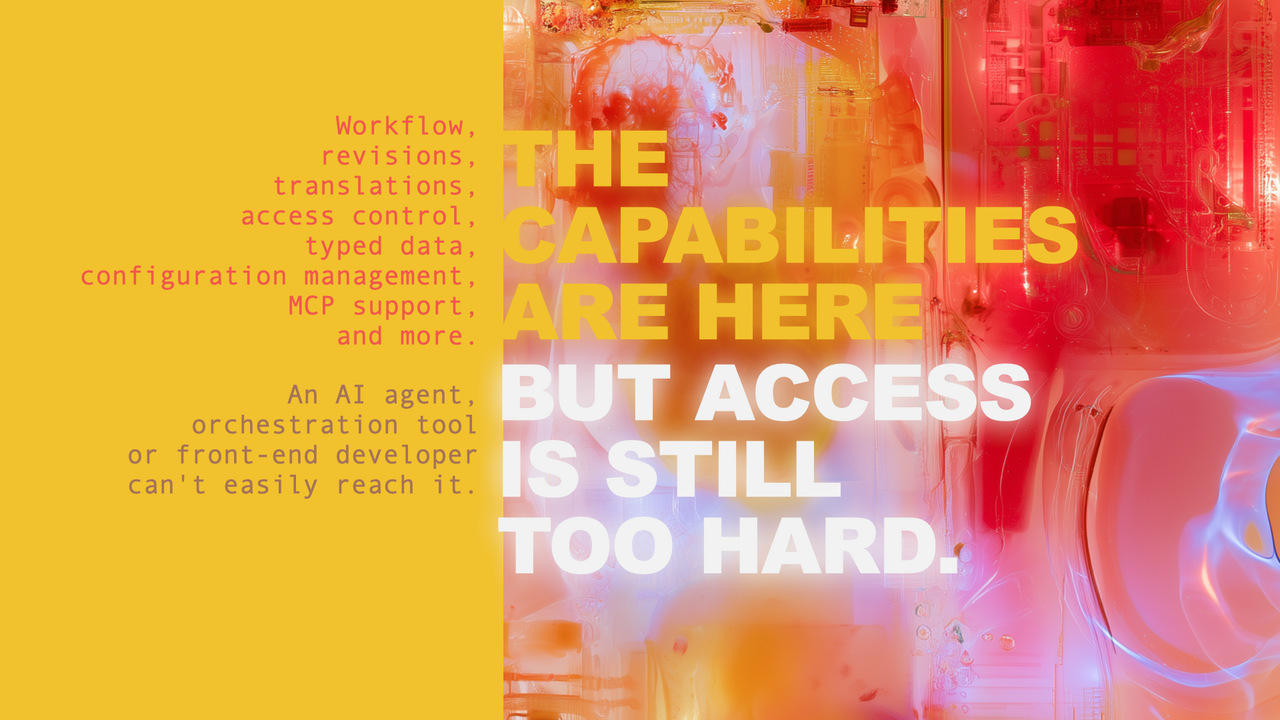 A slide from my DrupalCon Rotterdam 2026 keynote: Drupal has the capabilities, but making them available to other software is still too hard.
Installing a Drupal module should make its capabilities available to software already connected to a site: new tools for assistants, new operations for workflows, and new capabilities for front-end developers.
In my album module, I should only have to describe a photo once and implement photo search once, not write a separate integration for every assistant, front end or workflow system.
In Drupal, we already know why shared descriptions matter. When a site builder adds a field to a content type, Drupal stores a definition for it: its type, its label and whether it's required. Content editing forms, Views and JSON:API all reuse that definition.
CCK, Drupal's Content Construction Kit, let site builders define a field once, and Drupal used that definition for the edit form, the display and the database. Views let them list, filter and sort data from any module that described its data. Rosetta is about extending that kind of reuse to more of a module's data and operations.
Shared descriptions of data and operations could be Drupal's next CCK and Views moment.
User interfaces also keep changing: web pages, then native mobile apps, then headless front ends, then chat, and now AI assistants and agents. I don't know what comes after agents. But if modules describe their data and operations, new interfaces can build on the capabilities we already have. The next interface reads the description and gets to work. That won't make Drupal immune to change, but it makes us fast to adapt, and fast to adapt helps us win.
The question then becomes how to make that practical for thousands of module maintainers. Tool API gives us a starting point, alongside years of work on Typed Data, Single Directory Components, JSON:API, Drupal Canvas Code Components, Modeler API, and more. We need the people behind that work to help shape the approach, including whether Tool API, or parts of it, belongs in Drupal Core.
That's why I'm organizing the Rosetta Sprint: a few days for the people behind these projects to get together in person to compare the existing approaches, identify what is missing and agree on next steps with the relevant maintainers and Core committers.
Describe existing data and expose functions as tools
Tool API supports two ways to define a tool: (1) you can write a dedicated plugin class that Drupal discovers as a tool, or (2) add PHP attributes to an existing public method on a class registered as a Drupal service.
I started with a dedicated plugin class but ultimately switched to PHP attributes. Attribute support was still experimental when I started, and I helped improve Tool API as I used it (#3583030, #3583031, #3583032, #3583041, #3583085). The attribute support is now merged and available in Tool API's development version. Dedicated plugin classes remain fully supported.
I'll show the basic pieces here rather than walk through a full tutorial. Here is how the method that searches my photos becomes the find_images tool, simplified a little:
/**
 * Searches the images.
 *
 * @param string $query
 *   Words to look for in the title, caption or alt text.
 *
 * @return \Drupal\album\Image[]
 *   The matching images.
 */
#[ToolMethod(
  id: 'find_images',
  label: 'Find images',
  description: "Searches the site's images. …",
  operation: ToolOperation::Read,
  permission: 'access content',
)]
public function search(string $query): array {
  // The search code is unchanged.
}
The method body stays the same: it takes a search query and returns the matching images. The #[ToolMethod] attribute gives the tool its ID, label and description. It also declares that the operation reads data and that the caller needs the access content permission. The search code must still enforce any restrictions on which photos the caller can see.
Tool API reads the input's name and type, query and string, from the method signature. When type information is missing, Tool API tries to infer it from the method signature and docblock. Here, the Image[] return annotation tells Tool API that the array contains Image objects.
Knowing that the result is a list of Image objects doesn't tell other software which properties a photo has. I describe those with #[ToolProperty] attributes on the Image class's getters, like getAlt() above.
The attributes also explain what each property means. In PHP, a title, a caption and a URL can all be strings, but other software needs to know which is plain text, which contains HTML and which is a URL. I illustrated that distinction in the keynote:
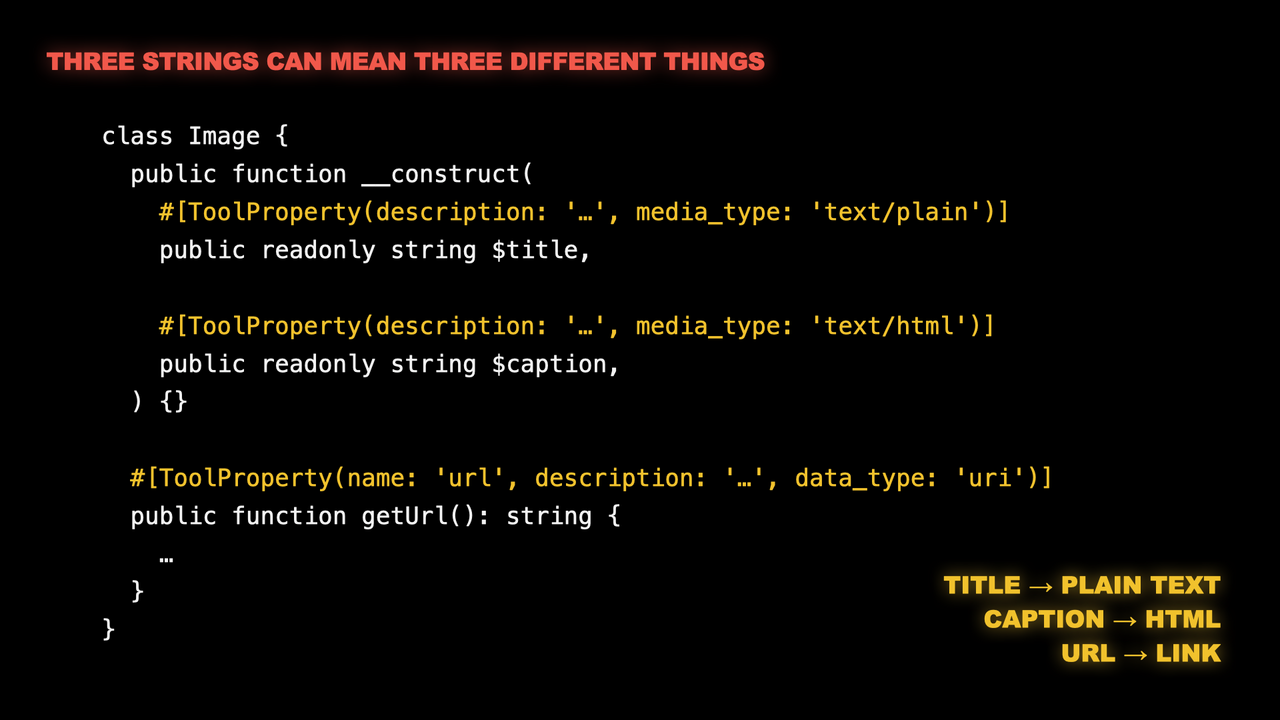 A slide from my DrupalCon Rotterdam 2026 keynote: all three values have PHP's
 string type, but #[ToolProperty] attributes describe the title as plain text, the caption as HTML and the URL as a URI.Tool API only includes the photo properties I explicitly describe with #[ToolProperty]. The attribute can go on a public class property or a getter method. On getUrl(), it exposes the returned value as a photo property named url; it doesn't make the getter a callable tool.
Under the hood, Tool API uses Drupal's Typed Data API to represent these descriptions and can generate JSON Schema from them.
Drush, MCP, ECA, FlowDrop, Maestro and my album module's custom HTTP route can all call the same runner, ToolRunner::run(). That means the same permission checks and input validation apply whichever way a tool is called. The runner also distinguishes invalid input from denied access or an execution failure, so each integration doesn't have to work that out for itself.
As mentioned, PHP attributes aren't the only way to define a tool. A dedicated plugin class is a bit more verbose, but it has some advantages. For example, it doesn't have to live in the module it exposes. A separate module can define the tools and call the original module's services and APIs, with no changes to its code. Tool Belt currently takes that separate-module approach for Drupal Core operations, like creating content and updating fields. That means we can add tool support for existing modules without waiting for their maintainers to adopt Tool API.
If you maintain a module, try exposing one useful operation as a tool. If you get stuck, or Tool API can't describe the data you need, open an issue. Your feedback can help us improve Tool API before its first stable 1.x release. Tool API is still young, so you can help shape it.
AI assistants can handle complex tasks without developers
I actually started with search. A while ago, I exposed my blog's search to AI agents and wrote about it several times: as an MCP tool, through an API catalog and with Agentic Resource Discovery. That code started out custom, but I've since updated it to use Tool API as well.
Later, I added the album tools. My album module provides seven. The ones I use most are find_images and get_image, which find and read photos, and update_image, which changes a photo's title, caption or alt text.
I've used these tools to write titles and alt text for whole albums. Here are a few other things I ask an assistant to do:
- Find every photo that still has no alt text, across all albums, and suggest alt text for me to review.
- Find typos or grammar issues in my captions.
- List the photos in an album that have no title, and suggest titles for me to review.
The album tools and find_posts often work together. If I have an album from a trip and a blog post about the same trip, an AI assistant can call find_posts while it writes alt text for the album's photos, and use the post as context. It picks up details such as where we went, who was there and what the trip was for. The alt text gets better, without me having to point the assistant at the post.
My album module's admin screens can't do any of these tasks quickly, and some tasks have no screen at all. Before these tools, I either had to run SQL queries on the database or didn't do the task at all. To fix missing alt text, I'd query for the photos without it, then open each photo's edit screen in a browser. Updating dozens of images that way gets tedious.
Now an assistant finds the photos and drafts the alt text, and I review and approve its suggestions in Claude. It's at least 10 times faster than my old workflow.
I've been writing SQL for nearly 30 years, so I could always do these jobs myself. Many site owners can't. They ask a developer for help, or the job never gets done. Tools can remove that dependency. Photos are just my example. Any operation a module exposes as a tool becomes something a site owner can ask for directly, without waiting for a developer.
AI assistants can handle complex tasks without dedicated UIs
When an assistant calls get_image, it gets the photo's properties and the photo itself, so it can see what it's describing. In Claude, an interface I built also displays the photo in the chat. It uses MCP Apps, an MCP extension that lets a server provide an HTML interface the client renders in the conversation.
Every module has tasks that are too rare or too specific to justify a screen of their own. A maintainer can build screens for everyday work and make rare or specialized tasks available through tools. I've already removed parts of my album module's interface, like the button that generated alt text with a language model, because an assistant now does that job. I expect to remove more.
Shared descriptions can also make it easier to tailor interfaces to the people using them. Tool API can already generate a form from a tool's inputs and apply the same validation constraints when the tool is called without a form. Michael Lander is exploring this further in his Data Surface prototype, where forms and tools use the same definitions of accepted values and validation rules.
An organization could build admin screens around its own workflow while reusing those definitions and validation rules. With the right prompting, assistants can already build interfaces around these tools. For a batch of photo updates, that could be a table of images and proposed alt text where I can review and approve the changes. Over time, I expect assistants to recognize when an interface would help with a task and build one without being asked.
Michael's work builds on Drupal's configuration validation, and it is a good example of what I mean when I say Drupal has an accidental AI advantage. Wim Leers began advocating for configuration validation in 2022. AI wasn't part of his case. Years later, Michael can reuse those validation constraints to power forms and tools from one definition, and in Validation-first, Wim describes how the same precision helps AI tools generate valid Drupal Canvas code components.
JavaScript front ends can use the same tools as AI assistants
But that is not all. With my album data and operations described, I decided to make the same data and tools available to front-end developers. I wrote two pieces of connecting code: a shared HTTP route that calls read-only tools, and a generator that produces an OpenAPI document from their definitions. Together, they take under 150 lines of PHP.
The route uses the URL to identify the tool and the query string to supply its arguments. For example, a request to /api/find-images?query=ski calls find_images with ski as its query and returns the result as JSON. I didn't write another photo search or a separate route for each tool.
The auto-generated OpenAPI document, available at https://dri.es/openapi.json, describes those endpoints, their parameters and their responses. It uses the same #[ToolMethod] and #[ToolProperty] attributes the MCP tools use.
OpenAPI is a 15-year-old standard for describing HTTP APIs, so it's supported by many developer tools. Swagger UI, for example, lists my endpoints and lets you try them. This video shows the document, then Swagger UI reading it and calling the API for "driesnote":
Many front-end developers use TypeScript, which adds static types to JavaScript. A type can describe an image as an object with a string alt and a string title. The TypeScript compiler checks the code against those types before it runs, and editors like VS Code show type errors as you write.
To see what this gives a front-end developer, I asked Claude Code to build a small React app that searches my photos from the browser. The app knows nothing about Drupal, and building it didn't require any Drupal knowledge either. All Claude Code had was my site's URL and its generated OpenAPI document.
I'm not a front-end developer, so it was interesting to watch. Claude used a code generator called openapi-typescript to turn my OpenAPI document into TypeScript types in under a second. A small library called openapi-fetch then uses those types, so the compiler can check the request paths and parameters in the app's code.
The whole app is a single React component of 45 lines, and I wrote no additional Drupal code for it. In this video, it searches for "driesnote":
The HTTP route and OpenAPI generator are prototype code on my site. Nothing in them is specific to photos, so they shouldn't be something each site or module has to write. They belong in shared infrastructure that works for any module's tools. JSON-RPC is one place that could happen: if JSON-RPC supported Tool API, it could expose tools from other modules without each module writing its own JSON-RPC integration.
Workflows can call module operations as tools
Inside Drupal, ECA, FlowDrop and Maestro can call tools as steps in a workflow. The ECA Tool module, for example, makes tools available as ECA actions.
In the keynote, Shibin Das showed a FlowDrop workflow he built with my album module's tools. It searches my photos and lists my albums, first without any AI, then with an agent that decides which tools to use:
Workflow systems can also expose tools of their own. ECA calls its workflows "models", and the ECA Tool module exposes each Tool event in a model as a separate tool. One model can therefore offer several tools. Maestro can expose public workflow templates as tools, using their variables as inputs.
A workflow that is also a tool can be used like any other tool. A Maestro workflow can call a tool exposed by ECA, through the same Tool API integration it uses to call my photo search. Neither system needed a direct integration with the other. I still find that a little hard to get my head around, but I love it and see the potential.
Automation platforms outside Drupal need a way to call those tools too. Last year, Jürgen Haas and I built the Orchestration module to connect Drupal with Activepieces. It lets Activepieces call tools defined through Tool API, run AI agents and trigger ECA models, while events in Drupal can trigger workflows in Activepieces. I described that setup in Connecting Drupal with Activepieces. Other platforms can call Drupal's tools over MCP, for example through n8n's MCP Client node.
Tools compose. An assistant can combine them in a single task, a workflow can chain them, and a workflow can be one of the tools in another workflow. Once a system can call Drupal's tools, it can reuse that connection for operations from different modules.
That is the orchestration shift: a stack becomes a network, and workflows coordinate work across applications. Drupal can be a node in that network, with its modules offering operations that other systems can call. For agencies building those workflows, Tool API makes Drupal's capabilities available as reusable steps.
Drupal components can share data descriptions
So shared descriptions help JavaScript front ends and other applications use Drupal's data, but they can also help Drupal's own rendering system, even when no AI assistant or external application is involved.
My photos are rendered using Single Directory Components, or SDCs. Each component keeps its Twig template, CSS and metadata in one folder. Its .component.yml file declares the component's inputs, called props, and describes the data they accept.
My album module already describes a photo's properties with #[ToolProperty] attributes. I was also maintaining descriptions of those same properties in each photo component's .component.yml file. When I changed what a photo property contained, I had to remember to update both descriptions.
So I wrote a Drush command that reads the PHP attributes and generates a shared schema.json file. My album module's generated photo schema describes properties such as alt and caption: their types and what they contain. Each photo component's .component.yml file now references that shared description instead of describing those properties again. When I change what a photo property contains, I update its PHP attribute and run the command.
Moving the descriptions into a shared file creates a new problem. Anything that reads a component's .component.yml now finds a reference to schema.json, not the property definitions. A tool that builds a component catalog, showing what data each component expects, has to find and resolve that reference itself. Core's component API doesn't do it for them: it returns the reference without the photo's property definitions.
Pierre Dureau's merge request in Core issue 3352063 addresses that gap, though it isn't merged yet. With it applied on my site, Core's component API followed the reference and loaded the photo property definitions, without any changes to the schema file.
That matters for generative UI. Frameworks like OpenUI and A2UI let an AI agent assemble an interface from a catalog of components, so they need to know which components exist and what props each one accepts. With this change, an integration could build that catalog from Drupal's API instead of writing its own reference resolver. Tools that read the component files directly still need to learn to follow these references. The SDC add-on for Storybook, a tool for developing and previewing components, doesn't yet follow the Drupal-specific references I use.
The same goes for the generator. Other module maintainers shouldn't each have to write one like mine. My experiment uses Tool API's property descriptions, but describing data and generating schemas are useful beyond tools. Some of that support could belong in Drupal Core, benefiting both SDC and the Icon API, which uses JSON Schema to describe icon settings such as size and color.
My approach only covers components built to render my module's photos. General-purpose components define their own inputs and still need a way to get Drupal's data. Drupal describes entity fields with Typed Data, while SDC describes props with JSON Schema. UI Patterns already handles much of the work between them, including which data sources can supply a prop. Rosetta should build on that work too.
Make shared descriptions standard practice
The same photo descriptions and operations now support AI assistants, a React app, workflows inside and outside Drupal, and Drupal components.
I want more module maintainers to adopt Tool API: describe their modules' data once and expose useful operations as tools. That should become a normal part of developing and maintaining a Drupal module.
We should also provide the HTTP integration, OpenAPI generator and component schema generator as shared Drupal infrastructure. Module maintainers shouldn't each have to write that connecting code.
My prototypes show this working for one module. Rosetta is about making that reuse work across Drupal. We need to work with the relevant maintainers and Core committers to decide what belongs in Tool API, its integrations and Drupal Core.
If you maintain a module, try exposing one useful operation as a tool and using it with another system. Share what worked, and open an issue when you find something Tool API can't describe or do.
Thanks to Jamie Abrahams, Mateu Aguiló Bosch, Ronald te Brake, Shibin Das, Pierre Dureau, Matt Glaman, Jürgen Haas, Marcus Johansson, Randy Kolenko, Michael Lander, and Fons Vandamme for reviewing this post.
21 Oct 2026 8:59pm GMT
Dries Buytaert: Introducing Garry Kasparov
Yesterday evening, I had the pleasure of introducing Garry Kasparov in Antwerp, ahead of his talk on AI and human intelligence.
Last year, I got to play chess against him. This time, I got to tell a room full of people why I admire him.
It was a memorable evening for me, and I wanted to capture it here by sharing my speech.
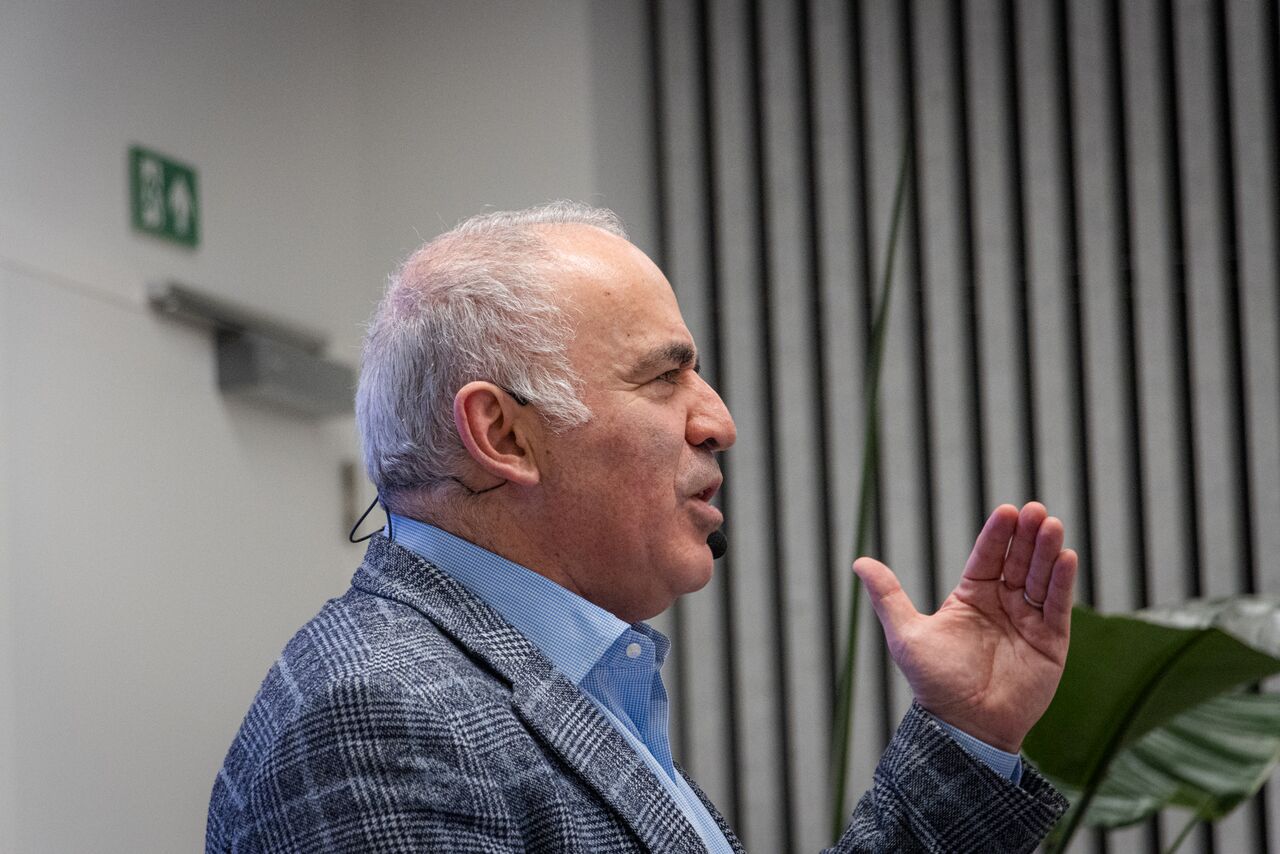 Garry Kasparov on AI and human intelligence. A year after losing to him in twenty-five moves, I got to introduce him instead. © Freek Swinnen.
Good evening, everyone.
I'm Dries Buytaert, a Belgian technologist. I created Drupal, Open Source software for building websites.
I've been asked to introduce Garry Kasparov and share some of my own thoughts on AI along the way.
Think of me as the warm-up act.
As I was preparing for tonight, I realized Garry and I have something in common. We both had a big year at the age of twenty-two. I released the first version of Drupal. And Garry became world chess champion.
My launch attracted slightly less attention.
At the time, Garry was the youngest world chess champion ever. And he spent about twenty years as the world's number one.
Last year, thanks to Inge Geerdens and Your Next Move, I got to play Garry myself. That was a dream come true. For me, he's the greatest chess player of all time.
He was playing against twenty of us at the same time. I knew I was going to lose. The only question was in how many moves. Garry won all twenty games, and I lasted twenty-five moves.
He might not remember our game, but I'll remember it for the rest of my life.
I played the Caro-Kann Advance Variation and was out of book after six moves.
Long before our game, Garry's games against a computer made headlines around the world. In 1996, Garry beat IBM's Deep Blue. But a year later, Deep Blue won the rematch.
For the first time in history, a computer, equipped with AI, had beaten the world chess champion in a full match.
Some people make history by being the first to climb Mount Everest. Others, by being the first to walk on the moon.
Garry made history nearly thirty years ago ... as the first knowledge worker to lose his job to AI.
Garry, on behalf of everyone in this room ... thank you for going first.
A quick show of hands: who here has wondered, "What does AI mean for my job?".
What I really admire is what Garry did after his loss to Deep Blue. He immediately turned around, embraced AI, and explored how it could make him a better player. That takes an open mind, confidence and curiosity.
Today, it's our turn to rethink how we work and learn with AI. AI is changing how we compete, and what it takes to stay ahead.
If you run a business, you know how quickly competitors can learn from your success. In top-level chess, your games are recorded and stored in a public database. Your competitors can study them, move by move.
Garry had to keep improving while his competitors were learning from him. And when he retired from professional chess in 2005, he was still number one.
With Drupal, we compete in the open, too. Drupal has powered millions of websites around the world. Drupal is Open Source, which means anyone can use it for free, study the code, copy it, and change it. All for free.
Open Source democratizes access to technology. And it gives people more digital sovereignty: more control over the tools they depend on.
But it also means our competitors can start with the same code. We even give them the installation instructions and the manual.
When Garry and I played last year, we started with the same chess pieces. In exactly the same positions.
It turns out that is not enough to win.
Not for me. And not for the other nineteen players he beat.
Having the same tools doesn't mean you get the same results. And that is true in business, too.
Your competitors have access to the same AI tools you do. What matters is the expertise and judgment you bring, and how well you understand your customers.
And our choices about AI matter beyond business, too. AI is changing geopolitics. It's changing who holds power.
We've all seen those photographs of world leaders meeting the heads of technology companies. Those companies are now helping to shape national security, energy, and the economy. With that influence come questions about how we protect freedom and democracy.
For me, technology is at its best when it gives people more opportunity and more control over their own lives. That's what motivates me in Open Source. And it's what excites me about AI.
It's also why I value Garry's perspective.
Garry earned the world's attention through chess, then used his voice to stand up for the freedom of others, including the people of Ukraine.
For twelve years, Garry chaired the Human Rights Foundation. Today, he is the founder and chairman of the Renew Democracy Initiative.
For more than twenty years, he has stood up to Vladimir Putin and fought for a free and democratic Russia. He even tried to run for president.
Last year, some of us had dinner with Garry. Someone asked him what he still wanted to achieve in his life.
His answer has stayed with me.
He said he wanted to be able to visit his mother's grave in Russia.
Because of his opposition to Putin, he cannot safely return.
For Garry, freedom is deeply personal.
That combination of curiosity about technology and commitment to people is why I'm so glad he's here to talk about the future of AI.
Please join me in welcoming the thirteenth world chess champion, author, and advocate for freedom and democracy ...
Garry Kasparov.
21 Oct 2026 8:59pm GMT
Amedee Van Gasse: Fighting AI-generated comment spam on WordPress


Recently, I've been getting a new type of comment spam on my blog.
The comments are surprisingly relevant to the articles they're posted on. They refer to the actual content of the blog post, use appropriate terminology and even sound as though someone has taken the time to read what I wrote.
Except they have that familiar, bland, generic style of AI-generated text. They say something vaguely positive about the article, perhaps add a superficial observation, and then include a link.
The link is the whole point.
I suspect these comments are generated by large language models (LLMs). Rather than posting the same generic spam message everywhere, spammers can now generate a superficially relevant comment for each individual blog post. That makes the comments harder to distinguish from genuine contributions using simple content filters.
I don't particularly mind whether someone uses AI to help write a comment. What bothers me is using AI to manufacture plausible-looking comments solely to smuggle promotional links onto other people's websites.
So I decided to address the actual problem rather than trying to determine whether a comment was written by a human or an AI.
No URLs in comments
My solution is straightforward: comments on my blog are no longer allowed to contain URLs.
I use the Code Snippets plugin to add a few small PHP snippets to WordPress.
The first removes the Website field from the comment form. The second rejects comments containing URLs. Another one prevents comment authors' names from linking to their websites, including when older comments already have a URL stored in WordPress. And finally, comments are disabled on any post older than 180 days.
This doesn't stop bots from submitting AI-generated comments. They can still generate text that refers to the article, praise the author and imitate the style of a genuine discussion.
But they can't use the comment to publish their spammy links.
That's the distinction I care about. I don't need to identify every spammer or build a perfect AI detector. I just need to remove the incentive for this particular kind of spam.
If someone genuinely wants to contribute to a discussion, they can still do so. They simply can't use my comment section as a vehicle for link promotion.
A small, pragmatic solution
This isn't a universal solution to comment spam. Spammers can adapt, and not every unwanted comment contains a URL. The URL detection is also based on pattern matching, so it isn't foolproof.
But it addresses the behaviour I'm actually seeing, without adding another dedicated plugin or trying to outsmart the latest AI-generated text.
If the bots want to keep writing bland, AI-generated comments about my blog posts, they're welcome to try.
They just won't get to leave their links.
The actual PHP code is left as an exercise to the reader.
21 Oct 2026 8:59pm GMT